<?xml version="1.0" encoding="utf-8"?><feed xmlns="http://www.w3.org/2005/Atom" ><generator uri="https://jekyllrb.com/" version="3.10.0">Jekyll</generator><link href="/feed.xml" rel="self" type="application/atom+xml" /><link href="/" rel="alternate" type="text/html" /><updated>2025-10-24T14:00:34+00:00</updated><id>/feed.xml</id><title type="html">Programming with Plasma</title><subtitle>Musings of a Research Software Engineer working at a fusion lab</subtitle><author><name>Matt</name></author><entry><title type="html">Using Restic for Easy Backups When You Can’t Avoid OneDrive</title><link href="/2025/02/07/restic-and-rclone-for-backups.html" rel="alternate" type="text/html" title="Using Restic for Easy Backups When You Can’t Avoid OneDrive" /><published>2025-02-07T00:00:00+00:00</published><updated>2025-02-07T00:00:00+00:00</updated><id>/2025/02/07/restic-and-rclone-for-backups</id><content type="html" xml:base="/2025/02/07/restic-and-rclone-for-backups.html"><![CDATA[<p>In your working life, it is a sad truth that you can’t always use the technologies you might prefer.
Policies and decisions can be made at varying levels of your organisation that dictate and restrict your use of tools.
In most organisations, this means interacting with software and products developed by Microsoft,
and if you use a Linux distribution for your OS,
this will invariably lead to compatibility issues and interfacing pain.
I want to share one technological solution that has eased the pain of doing this for the particular case of creating backups.</p>

<h2 id="backup-storage-location">Backup Storage Location</h2>

<p>I’m not going to justify the necessity of keeping <em>full</em> backups of your machine because that is covered extensively by many sources.
If you have ever lost a significant amount of data from a piece of hardware giving up the ghost or a software update gone awry,
then you know through difficult experience the truth of the previous statement.
What I instead want to address here is the problem of where to store your backups once you have decided to make them.</p>

<p>For my personal laptop, I use an external hard drive, but in a work context this often isn’t appropriate for what I suppose is mainly security  issues:
having a slew of hard drives floating around with potentially sensitive data on them is just asking for trouble.
If your company has a Microsoft 365 subscription, then it is likely the policy will be for any off-device storage to be on that.
This is already done by default for Windows users,
but returning to the observations in the first paragraph,
how does someone on a Linux machine get their backups onto OneDrive?</p>

<h2 id="how-to-create-your-backup">How to Create Your Backup</h2>

<p>I grappled with this question for quite an extended period.
One option I used for a while was use the tried-and-trusted <code class="language-plaintext highlighter-rouge">tar</code> to create compressed archives of my home folder,
and then I would upload those via the browser interface to OneDrive.
However, this very quickly grows the storage size for all your backups,
and it is wasteful because there is realistically quite a lot of duplication between backups.
<code class="language-plaintext highlighter-rouge">tar</code> can mitigate this with incremental archive creation,
but this is fundamentally quite fiddly and hard to implement yourself.
However, the real problem I was encountering was that the archive had to initially be created <em>somewhere</em> on my devices hard drive,
meaning it no longer becomes possible to do once your hard drive is more than half full.</p>

<p>Luckily, I finally happened upon an amazing CLI tool called <a href="https://rclone.org/"><code class="language-plaintext highlighter-rouge">rclone</code></a>,
which eventually led me to the related <a href="https://restic.net/"><code class="language-plaintext highlighter-rouge">restic</code></a> for performing backups.
I had a false start with <code class="language-plaintext highlighter-rouge">rclone</code> because I thought I could just pipe my old <code class="language-plaintext highlighter-rouge">tar</code>-based backup through it and into OneDrive.
However, I quickly ran into issues with the connection being throttled or dropped,
and this seems to be something related to how OneDrive operates when something attempts to upload a massive file to it.
It is <code class="language-plaintext highlighter-rouge">restic</code> that nicely wraps <code class="language-plaintext highlighter-rouge">rclone</code> and handles appropriate chunking of the data being backed up so that this problem is avoided.</p>

<h2 id="configuring-restic">Configuring Restic</h2>

<p>First, you will need to initialise what <code class="language-plaintext highlighter-rouge">restic</code> calls a “repository” where it will store your backups.
The repository will be accessed through <code class="language-plaintext highlighter-rouge">rclone</code>, so you need to configure that first to authenticate with your storage provider,
in this case OneDrive.
<a href="https://restic.readthedocs.io/en/stable/030_preparing_a_new_repo.html#other-services-via-rclone">The instructions</a> for using <code class="language-plaintext highlighter-rouge">restic</code> with <code class="language-plaintext highlighter-rouge">rclone</code> are very good and you can use that to get set up,
in particular making sure you navigate to the <a href="https://rclone.org/onedrive/"><code class="language-plaintext highlighter-rouge">rclone</code> configuration step with OneDrive</a>.
For the <code class="language-plaintext highlighter-rouge">rclone</code> configuration, you will set up a remote that has a <code class="language-plaintext highlighter-rouge">&lt;name&gt;</code>.
Remember that name because you will need to use it when specifying the <code class="language-plaintext highlighter-rouge">--repo</code> given to any <code class="language-plaintext highlighter-rouge">restic</code> command.</p>

<p>Once configured, I use the following command to perform the backup of my home folder:</p>

<div class="language-bash highlighter-rouge"><div class="highlight"><pre class="highlight"><code>restic <span class="nt">--repo</span> rclone:&lt;name&gt;:&lt;backup-path&gt; <span class="nt">--verbose</span> <span class="nt">--exclude-file</span> <span class="nv">$HOME</span>/configs/rclone_exclude backup ~/
</code></pre></div></div>

<p>Again, the <code class="language-plaintext highlighter-rouge">--repo</code> argument should include the <code class="language-plaintext highlighter-rouge">&lt;name&gt;</code> of the <code class="language-plaintext highlighter-rouge">rclone</code> remote you have configured,
and the <code class="language-plaintext highlighter-rouge">&lt;backup-path&gt;</code> will be the folder on OneDrive into which your backups will be stored.
Don’t expect to see normal files in that folder, however.
<code class="language-plaintext highlighter-rouge">restic</code> does what most proper backup solutions do, which is store blobs with a hashed name.
There is then an index that helps instruct <code class="language-plaintext highlighter-rouge">restic</code> how these hashes can be used to recreate the file structure should you need to restore from the backup.
The other main option I provide is the <code class="language-plaintext highlighter-rouge">--exclude-file</code>, which specifies the folders or files in my home folder that I do not want backed up.
This is generally caches and temporary files that don’t need backing up,
but there also isn’t much harm in including them.
If you want a list to start from, <a href="https://github.com/bielsnohr/configs/blob/master/rclone_exclude">this is the exclude list I use</a>.
The file matching is according to <a href="https://rclone.org/filtering/#patterns">these patterns used by <code class="language-plaintext highlighter-rouge">rclone</code></a></p>

<p>What impressed me with <code class="language-plaintext highlighter-rouge">restic</code> is that after the fairly straightforward configuration steps above it just worked.
There seem to be a set of sane defaults that will work in most cases and ensure your backup smoothly makes its way onto OneDrive.</p>]]></content><author><name>Matt</name></author><category term="backup" /><category term="cli-tools" /><category term="onedrive" /><category term="microsoft" /><category term="restic" /><summary type="html"><![CDATA[In your working life, it is a sad truth that you can’t always use the technologies you might prefer. Policies and decisions can be made at varying levels of your organisation that dictate and restrict your use of tools. In most organisations, this means interacting with software and products developed by Microsoft, and if you use a Linux distribution for your OS, this will invariably lead to compatibility issues and interfacing pain. I want to share one technological solution that has eased the pain of doing this for the particular case of creating backups.]]></summary></entry><entry><title type="html">Cross Post Notification: Designing Effective Intermediate-Level Courses</title><link href="/2025/01/28/ssi-cchd24-intermediate-level-course-session.html" rel="alternate" type="text/html" title="Cross Post Notification: Designing Effective Intermediate-Level Courses" /><published>2025-01-28T00:00:00+00:00</published><updated>2025-01-28T00:00:00+00:00</updated><id>/2025/01/28/ssi-cchd24-intermediate-level-course-session</id><content type="html" xml:base="/2025/01/28/ssi-cchd24-intermediate-level-course-session.html"><![CDATA[<p>In November 2024, I attended <a href="https://biont-training.eu/CarpentryConnect2024.html">CarpentryConnect</a> in Heidelberg.
Along with Aleksandra Nenadic, I co-lead the Breakout Discussion “Developing and Delivering Training Material at the Intermediate Level”.
The outcome of that session was <a href="https://www.software.ac.uk/blog/designing-effective-intermediate-level-courses-challenges-and-insights">a blog post on the SSI blog</a>,
giving providing some initial guidance and advice about developing training material at the intermediate level.
We hope this will be starting point that many in the Carpentries teaching community will contribute to
and perhaps eventually make its way into formal lessons.</p>]]></content><author><name>Matt</name></author><category term="training" /><category term="research-software" /><category term="RSE" /><category term="intermediate-level" /><category term="python" /><category term="carpentry-connect" /><category term="carpentries" /><summary type="html"><![CDATA[In November 2024, I attended CarpentryConnect in Heidelberg. Along with Aleksandra Nenadic, I co-lead the Breakout Discussion “Developing and Delivering Training Material at the Intermediate Level”. The outcome of that session was a blog post on the SSI blog, giving providing some initial guidance and advice about developing training material at the intermediate level. We hope this will be starting point that many in the Carpentries teaching community will contribute to and perhaps eventually make its way into formal lessons.]]></summary></entry><entry><title type="html">A Better Development Experience with Jupyter Notebooks in VS Code</title><link href="/2024/03/04/jupyter-notebook-scripts-jupytext-vscode.html" rel="alternate" type="text/html" title="A Better Development Experience with Jupyter Notebooks in VS Code" /><published>2024-03-04T00:00:00+00:00</published><updated>2024-03-04T00:00:00+00:00</updated><id>/2024/03/04/jupyter-notebook-scripts-jupytext-vscode</id><content type="html" xml:base="/2024/03/04/jupyter-notebook-scripts-jupytext-vscode.html"><![CDATA[<p>In one of my work projects, we have taken to using
<a href="https://jupyter-notebook.readthedocs.io/en/stable/">Jupyter Notebooks</a>
quite extensively as a useful mode for presenting tutorials of our code base and even example use
cases. Notebooks allow for users or developers to incrementally step through workflows and see how
each stage works in detail. What’s more, they can easily inspect intermediate objects in the
workflows, and this can be an important debugging tool. I personally do this all the time.</p>

<p>However, there are a few issues with Jupyter Notebooks in a development setting. First, the default
notebook <code class="language-plaintext highlighter-rouge">.ipynb</code> file format is terrible for storing in version control. It is basically a JSON
file, and the real problem is it tracks far too much metadata that changes depending on the
environment in which the notebook is run. The cleanest solution I have encountered for this is a
tool called <a href="https://jupytext.readthedocs.io/en/latest"><code class="language-plaintext highlighter-rouge">jupytext</code></a>.</p>

<p><code class="language-plaintext highlighter-rouge">jupytext</code>’s approach is to pair the <code class="language-plaintext highlighter-rouge">ipynb</code> Classic Notebook format with a simpler Python source
file, called a <em>Text Notebook</em>, which can be more cleanly tracked in version control. Only the
text notebook is tracked because the the <code class="language-plaintext highlighter-rouge">ipynb</code> notebook can be reproducible regenerated from
the Python source file by <code class="language-plaintext highlighter-rouge">jupytext</code>. <code class="language-plaintext highlighter-rouge">jupytext</code> is able to achieve this by using some special
markup in the text notebook. The markup can be conveyed through a variety of formats, but the most
popular and robust seems to be
the <a href="https://jupytext.readthedocs.io/en/latest/formats-scripts.html#the-percent-format"><code class="language-plaintext highlighter-rouge">percent</code></a>
format or what <code class="language-plaintext highlighter-rouge">jupytext</code> calls <code class="language-plaintext highlighter-rouge">py:percent</code>.</p>

<p>Very quickly, notebook cells are delimited by <code class="language-plaintext highlighter-rouge"># %%</code>. Cell types can be specified with square
brackets after this delimiter, e.g. a Markdown formatted cell is indicated by <code class="language-plaintext highlighter-rouge"># %% [markdown]</code>.
All together, you get something that looks like this (taken from the <code class="language-plaintext highlighter-rouge">jupytext</code> documentation):</p>

<div class="language-python highlighter-rouge"><div class="highlight"><pre class="highlight"><code><span class="c1"># %% [markdown]
# This is a multiline
# Markdown cell
</span>
<span class="c1"># %% [markdown]
# Another Markdown cell
</span>

<span class="c1"># %%
# This is a code cell
</span><span class="k">class</span> <span class="nc">A</span><span class="p">():</span>
    <span class="k">def</span> <span class="nf">one</span><span class="p">():</span>
        <span class="k">return</span> <span class="mi">1</span>

    <span class="k">def</span> <span class="nf">two</span><span class="p">():</span>
        <span class="k">return</span> <span class="mi">2</span>
</code></pre></div></div>

<blockquote>
  <p>Note: the text notebook is always a valid Python script regardless of the format of the text
notebook. Therefore, you can always run <code class="language-plaintext highlighter-rouge">python text_notebook_filename.py</code>, and it will work.</p>
</blockquote>

<p>If you use the web interface for Jupyter (Lab or Notebook) and have installed the <code class="language-plaintext highlighter-rouge">jupytext</code> package
in your environment, then you should be able to directly open any Python source file in <code class="language-plaintext highlighter-rouge">percent</code>
format and have it rendered exactly as a normal <code class="language-plaintext highlighter-rouge">.ipynb</code> notebook.  This is what the above file
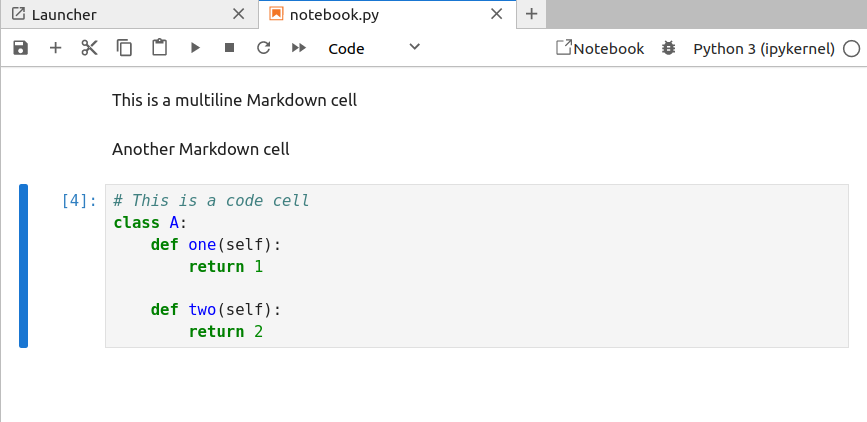
looks like when rendered in the usual Jupyter Notebook (actually JupyterLab) interface:</p>

<p><img src="/assets/images/jupyterlab_notebook_view.png" alt="A view of a basic notebook in a JupyterLab tab" /></p>

<p>The <code class="language-plaintext highlighter-rouge">jupytext</code> plugin will automatically handle ensuring that the <code class="language-plaintext highlighter-rouge">.py</code> source is updated as you
make changes in this notebook editing mode. You can also directly “pair” the text notebook <code class="language-plaintext highlighter-rouge">.py</code>
file with a traditional Jupyter notebook <code class="language-plaintext highlighter-rouge">.ipynb</code> file by going to
<code class="language-plaintext highlighter-rouge">File &gt; Jupytext &gt; Pair Notebook with ipynb document</code>.
Once again, <code class="language-plaintext highlighter-rouge">jupytext</code> will handle making sure that the two files are synchronised.</p>

<p>If you are happy editing notebooks in the Jupyter{Lab,Notebook} interface, then this is case closed.
As long as you only make changes here, <code class="language-plaintext highlighter-rouge">jupytext</code> handles the file syncing and saving, and then it
is only up to you to commit changes to the text notebook <code class="language-plaintext highlighter-rouge">.py</code> file in your version control.</p>

<p>On the other hand, if you are a VS Code user like me and prefer editing notebooks from its
interface, the situation is slightly less convenient because VS Code <em>does not</em> interface with the
<code class="language-plaintext highlighter-rouge">jupytext</code> plugin. You can edit the <code class="language-plaintext highlighter-rouge">.py</code> files directly as you would any Python source file without
a problem, but if you want to execute this file like it is a notebook, you will need to use VS
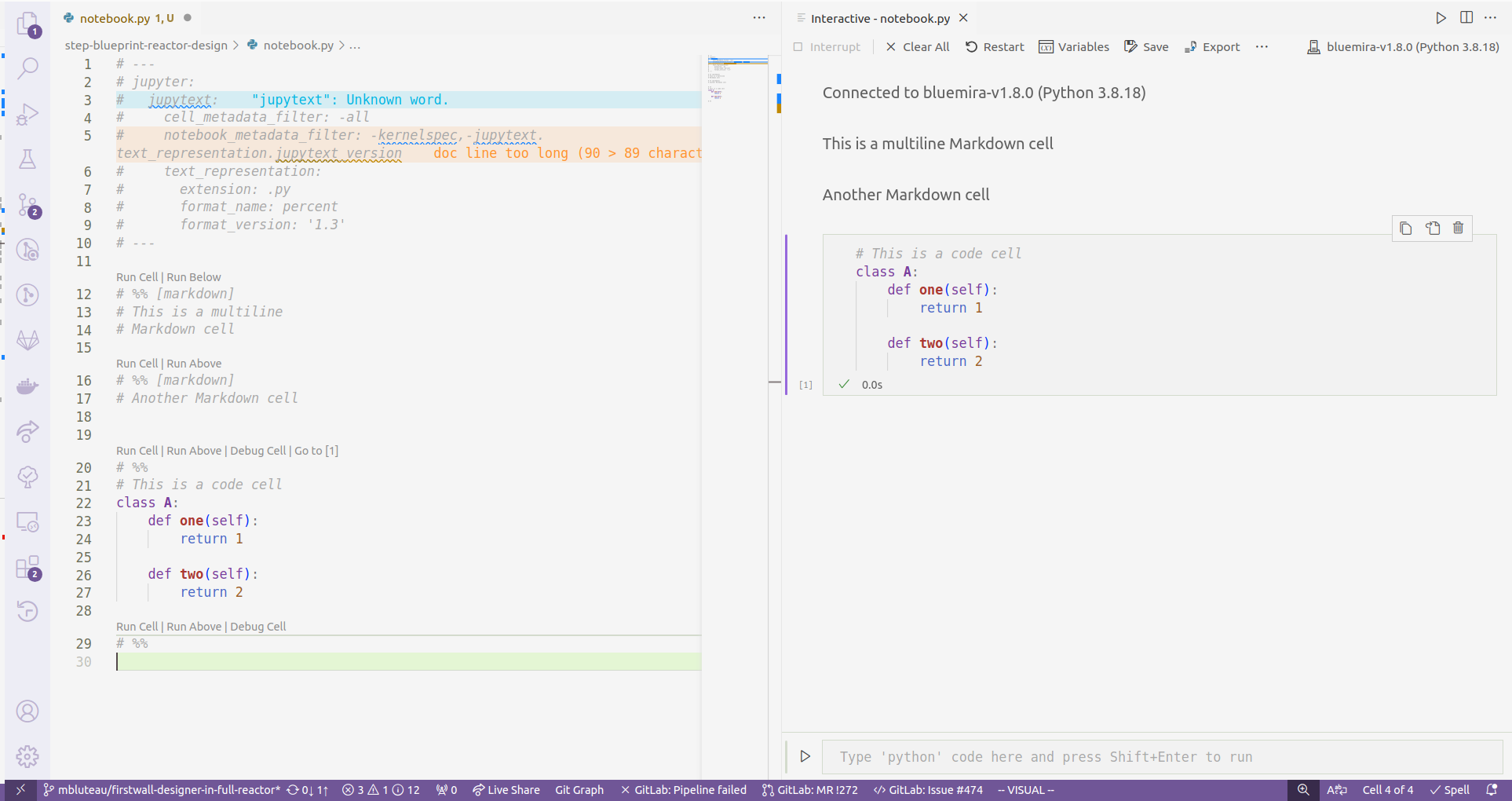
Code’s <em>Interactive Window</em> feature of its Jupyter integration.</p>

<p><img src="/assets/images/vscode_interactive_window_interface.png" alt="The Interactive Window interface in VS Code" />
<em>The Interactive Window interface in VS Code… kinda rubbish</em></p>

<p>So what’s the problem? Well, this <em>Interactive Window</em> interface is demonstrably worse than the
<em>Notebook</em> rendering that VS Code also offers. Autocomplete frequently fails in the <em>Interactive
Window</em> (right side pane in the figure above), and even when it does work, it tends to not detect
any of the non-standard library Python packages you have installed. There have been more than a few
people on the internet complaining about these severe deficits, but hey, it might work better for
you, so certainly have try before taking my word for it.</p>

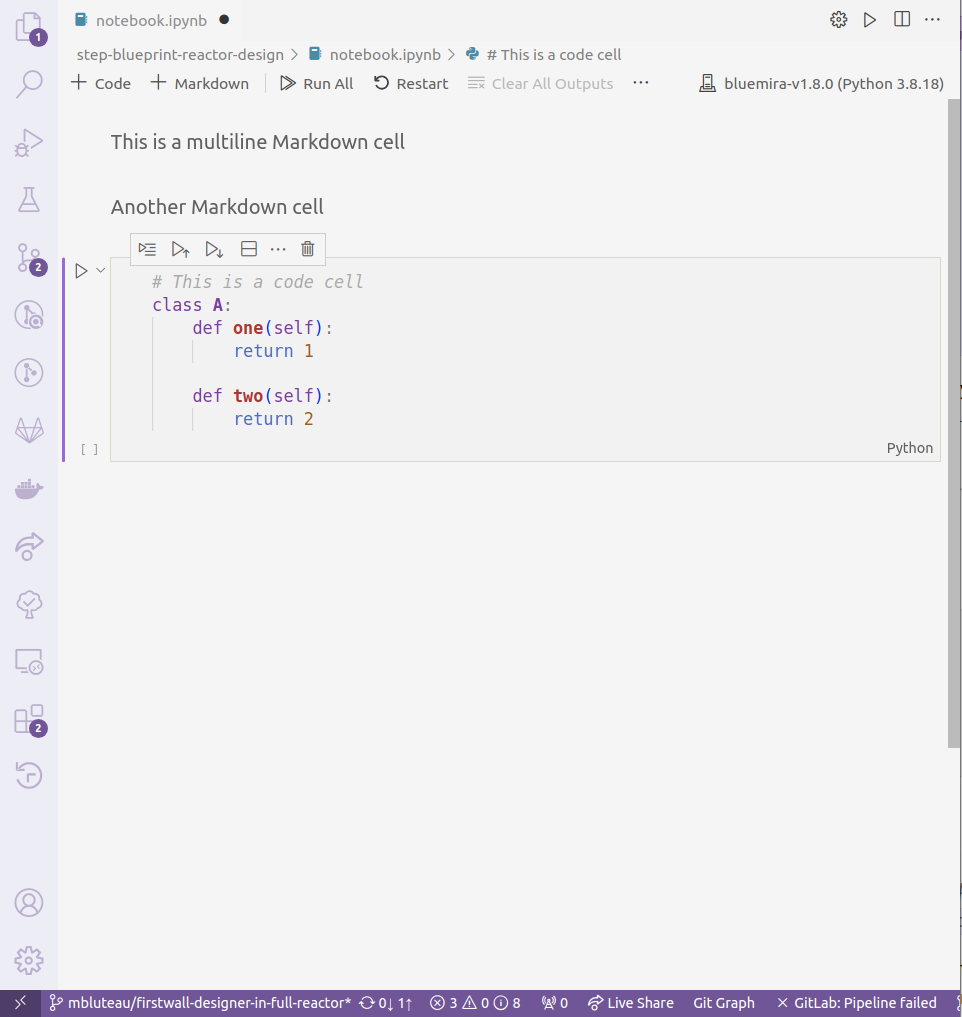
<p><img src="/assets/images/vscode_notebook_rendering_interface.png" alt="The Notebook rendering interface in VS Code" />
<em>The Notebook rendering interface in VS Code… much better</em></p>

<p>In order to instead use the <em>Notebook</em> interface, you need to have an <code class="language-plaintext highlighter-rouge">.ipynb</code> format file, but this
won’t be present by default in a repository using <code class="language-plaintext highlighter-rouge">jupytext</code> because the whole point is to get rid
of tracking this difficult file format. To generate a <code class="language-plaintext highlighter-rouge">.ipynb</code> file from a <code class="language-plaintext highlighter-rouge">.py</code> text notebook, run</p>

<div class="language-bash highlighter-rouge"><div class="highlight"><pre class="highlight"><code>jupytext <span class="nt">--sync</span> &lt;example_file&gt;.py
</code></pre></div></div>

<p>That command might not work if the script has never been “paired” with a notebook file,
so instead run</p>

<div class="language-bash highlighter-rouge"><div class="highlight"><pre class="highlight"><code>jupytext <span class="nt">--set-formats</span> <span class="s2">"py:percent,ipynb"</span> &lt;example_file&gt;.py
</code></pre></div></div>

<p>Open the <code class="language-plaintext highlighter-rouge">.ipynb</code> file in VS Code, and you will automatically have the <em>Notebook</em> interface.</p>

<p>The last tricky bit is that any changes to the <code class="language-plaintext highlighter-rouge">.ipynb</code> will not be automatically synced
with the paired <code class="language-plaintext highlighter-rouge">.py</code> text notebook that actually gets tracked by version control.
There are two complementary options that help with this.</p>

<p>First,
you can create a VS Code <em>task</em> that syncs the current notebook and <code class="language-plaintext highlighter-rouge">.py</code> script file you are
editing. Then, if you set this as the default <em>build task</em>, it will be available to run manually
with the shortcut <code class="language-plaintext highlighter-rouge">Ctrl+Shift+B</code>.  You create this task with a <code class="language-plaintext highlighter-rouge">task.json</code> file in the <code class="language-plaintext highlighter-rouge">.vscode/</code>
folder of your workspace. It should look like:</p>

<div class="language-json highlighter-rouge"><div class="highlight"><pre class="highlight"><code><span class="p">{</span><span class="w">
  </span><span class="nl">"version"</span><span class="p">:</span><span class="w"> </span><span class="s2">"2.0.0"</span><span class="p">,</span><span class="w">
  </span><span class="nl">"tasks"</span><span class="p">:</span><span class="w"> </span><span class="p">[</span><span class="w">
    </span><span class="p">{</span><span class="w">
      </span><span class="nl">"label"</span><span class="p">:</span><span class="w"> </span><span class="s2">"Jupytext sync"</span><span class="p">,</span><span class="w">
      </span><span class="nl">"type"</span><span class="p">:</span><span class="w"> </span><span class="s2">"shell"</span><span class="p">,</span><span class="w">
      </span><span class="nl">"command"</span><span class="p">:</span><span class="w"> </span><span class="s2">"${command:python.interpreterPath}"</span><span class="p">,</span><span class="w">
      </span><span class="nl">"args"</span><span class="p">:</span><span class="w"> </span><span class="p">[</span><span class="s2">"-m"</span><span class="p">,</span><span class="w"> </span><span class="s2">"jupytext"</span><span class="p">,</span><span class="w"> </span><span class="s2">"--sync"</span><span class="p">,</span><span class="w"> </span><span class="s2">"${file}"</span><span class="p">],</span><span class="w">
      </span><span class="nl">"problemMatcher"</span><span class="p">:</span><span class="w"> </span><span class="p">[],</span><span class="w">
      </span><span class="nl">"group"</span><span class="p">:</span><span class="w"> </span><span class="p">{</span><span class="w">
        </span><span class="nl">"kind"</span><span class="p">:</span><span class="w"> </span><span class="s2">"build"</span><span class="p">,</span><span class="w">
        </span><span class="nl">"isDefault"</span><span class="p">:</span><span class="w"> </span><span class="kc">true</span><span class="w">
      </span><span class="p">}</span><span class="w">
    </span><span class="p">}</span><span class="w">
  </span><span class="p">]</span><span class="w">
</span><span class="p">}</span><span class="w">
</span></code></pre></div></div>

<p>What is nice about this task is that it works both ways. If you want to sync changes that you make
in the <code class="language-plaintext highlighter-rouge">.py</code> text notebook to the <code class="language-plaintext highlighter-rouge">.ipynb</code> notebook, then execute the task when you are in the
editor for the <code class="language-plaintext highlighter-rouge">.py</code> file and jupytext will handle putting those changes into the <code class="language-plaintext highlighter-rouge">.ipynb</code> file.</p>

<p>Of course, it is likely you will forget to manually trigger this after making changes you want to
commit. To catch this, you can use the <code class="language-plaintext highlighter-rouge">jupytext</code> pre-commit hook that will automatically run the
synchronisation of all scripts and notebooks and prevent a commit if these files are in an
unsynchronised state. Assuming you use the <a href="https://pre-commit.com/">pre-commit</a> framework for your
git hooks, the entry in your <code class="language-plaintext highlighter-rouge">.pre-commit-config.yml</code> should be:</p>

<div class="language-yaml highlighter-rouge"><div class="highlight"><pre class="highlight"><code>  <span class="pi">-</span> <span class="na">repo</span><span class="pi">:</span> <span class="s">https://github.com/mwouts/jupytext</span>
    <span class="na">rev</span><span class="pi">:</span> <span class="s">v1.15.1</span> <span class="c1"># CURRENT_TAG/COMMIT_HASH</span>
    <span class="na">hooks</span><span class="pi">:</span>
      <span class="pi">-</span> <span class="na">id</span><span class="pi">:</span> <span class="s">jupytext</span>
        <span class="na">entry</span><span class="pi">:</span> <span class="s">jupytext</span>
        <span class="na">args</span><span class="pi">:</span> <span class="pi">[</span><span class="s2">"</span><span class="s">--sync"</span><span class="pi">,</span> <span class="s2">"</span><span class="s">--pipe"</span><span class="pi">,</span> <span class="s2">"</span><span class="s">black"</span><span class="pi">,</span> <span class="s2">"</span><span class="s">studies/**/*.py"</span><span class="pi">]</span>
        <span class="na">always_run</span><span class="pi">:</span> <span class="no">true</span>
        <span class="na">pass_filenames</span><span class="pi">:</span> <span class="no">false</span>
        <span class="na">additional_dependencies</span><span class="pi">:</span>
          <span class="pi">-</span> <span class="s">black==23.3.0</span> <span class="c1"># Matches your black hook if you use that</span>
</code></pre></div></div>

<p>There are a some important notes about this that took me quite a while to figure out. The first is
the <code class="language-plaintext highlighter-rouge">always_run</code> flag. This is needed because I intentionally don’t track <code class="language-plaintext highlighter-rouge">.ipynb</code> files and if the
changes have been made in a <code class="language-plaintext highlighter-rouge">.ipynb</code> file, then by default this hook will not run because none of
the relevant <code class="language-plaintext highlighter-rouge">.py</code> files under version control have changed. The other related caveat is that you
therefore need to specify the location of all your text notebook files in the <code class="language-plaintext highlighter-rouge">args</code> of your hook
(i.e the last entry in the list above).</p>

<p>Taking all of these little configuration odds and ends together, my experience developing with
Jupyter Notebooks in VS Code is now much better, and perhaps yours will be to. Even if you don’t use
VS Code, I imagine the pre-commit hook is something that would add value to your development
workflow.</p>

<h2 id="bonus-jupytext-configuration">Bonus: Jupytext Configuration</h2>

<p>Although not strictly necessary for the workflows above, it is worth mentioning that <code class="language-plaintext highlighter-rouge">jupytext</code>
itself should be configured so that it doesn’t retain too much noisy metadata. By default,
<code class="language-plaintext highlighter-rouge">jupytext</code> retains extraneous bits like the Python kernel version in the header metadata of a <em>Text
Notebook</em>. As with <em>Classic Notebooks</em>, this will vary depending on who opens the notebook. This is
the global configuration for <code class="language-plaintext highlighter-rouge">jupytext</code> that I currently use and is contained in <code class="language-plaintext highlighter-rouge">pyproject.toml</code>:</p>

<div class="language-toml highlighter-rouge"><div class="highlight"><pre class="highlight"><code><span class="nn">[tool.jupytext]</span>
<span class="py">notebook_metadata_filter</span> <span class="p">=</span> <span class="s">"-kernelspec,-jupytext.text_representation.jupytext_version"</span>
<span class="py">cell_metadata_filter</span> <span class="p">=</span> <span class="s">"-all"</span>
</code></pre></div></div>

<h2 id="bonus-2-automatically-triggered-sync-in-vs-code">Bonus 2: Automatically Triggered Sync in VS Code</h2>

<p>Ideally, I would like to not have to remember to synchronise <em>Classic</em> and <em>Text Notebooks</em> when
working in VS Code. As soon as I save one, the other should update to match. There default answer
from an internet search seems to be the <a href="https://marketplace.visualstudio.com/items?itemName=emeraldwalk.RunOnSave">Run on
Save</a> extension, but it
hasn’t been updated in 5 years, so I am somewhat hesitant to install it. I’m keen to hear if anyone
else has solved this in a more elegant manner!</p>]]></content><author><name>Matt</name></author><category term="jupyter-notebook" /><category term="jupyter" /><category term="vs-code" /><category term="jupytext" /><category term="pre-commit" /><summary type="html"><![CDATA[In one of my work projects, we have taken to using Jupyter Notebooks quite extensively as a useful mode for presenting tutorials of our code base and even example use cases. Notebooks allow for users or developers to incrementally step through workflows and see how each stage works in detail. What’s more, they can easily inspect intermediate objects in the workflows, and this can be an important debugging tool. I personally do this all the time.]]></summary></entry><entry><title type="html">Retrospective on Code Review in Research</title><link href="/2023/07/21/code-review-retrospective.html" rel="alternate" type="text/html" title="Retrospective on Code Review in Research" /><published>2023-07-21T00:00:00+00:00</published><updated>2023-07-21T00:00:00+00:00</updated><id>/2023/07/21/code-review-retrospective</id><content type="html" xml:base="/2023/07/21/code-review-retrospective.html"><![CDATA[<p>Code review plays a crucial role in ensuring quality in the software development lifecycle, and it
is a great practice for knowledge transfer within teams. However,
like with most standard software engineering practices, it is much less prevalent in the world of
research software development. It was this observation that led to the creation of the Research Code
Review Community (RCRC) by Hollydawn Murray (Health Data Research UK). I would like to take some
time in this post to reflect on the activities of the RCRC and some of the results for me personally
that came out of my involvement.</p>

<h2 id="the-research-code-review-community">The Research Code Review Community</h2>

<div style="float: right;width: 30%;padding-left: 20px">
    <img src="/assets/images/rcrc_square_20_80.svg" width="80%" padding-top="10px" padding-left="6px" padding-right="6px" />
    <figcaption>© 2021 RCRC</figcaption>
</div>

<p>Hollydawn led a rallying call at the beginning of 2021 to everyone in the research software
community to build consensus and awareness around good practice in code review. I came across it via
<a href="https://sorse.github.io/programme/posters/event-036/">a lightning talk at SORSE</a>. Acknowledging
that fostering this type of culture practice would require change at many levels, the RCRC (then
CRC) set out five working groups:</p>

<ol>
  <li>Diversity, equity, and inclusion</li>
  <li>Code review during development</li>
  <li>Code review at the time of publication</li>
  <li>Recommendations for stakeholders</li>
  <li>Training and education</li>
</ol>

<p>I was involved with the “Code Review During Development” group, or “dev-review” for short. We made
steady progress towards defining guidelines to implement code review in the research software
development workflow. The final outcome was <a href="https://dev-review.readthedocs.io/en/latest/index.html">a website with
flowcharts</a> to guide anyone developing
research software towards the practice of code review.</p>

<p>Sadly, like many volunteer-driven projects, the entire RCRC started to fizzle out
after about a year. It is an interesting topic why this happened in our particular case as with lots
of similar projects more broadly, but that is outside the scope of this current post. Personally, it
was a hugely valuable experience to collaborate with people from diverse domains, roles, and
countries, and it was one of my first true introductions into the power of the “open source” model.
However, I was still left with the feeling that our resource needed some further advertisement.</p>

<p>Our dev-review group gave one last kick at the can at CW22, running a workshop to get feedback on
the website and raise awareness about the project. But alas, we weren’t able to garner the interest
we needed.</p>

<h2 id="rsecon22-making-connections">RSECon22: Making Connections</h2>

<p>The story of the RCRC doesn’t quite end there. We all know how conferences can be great places to
connect with peers, and RSECon22 is no different. I was lucky enough to bump into another SSI
Fellow, Hannah Williams. In the course of our conversation, Hannah mentioned she had heard about my
work with the RCRC and said she would be interested to have the guidelines about code review
presented at her institution, the UK Health Security Agency (UKHSA).</p>

<p>Thankfully, Hannah followed up on this, and I was invited to give a talk at the UKHSA Code Review
Workshop in December 2022.</p>

<h2 id="ukhsa-code-review-workshop">UKHSA Code Review Workshop</h2>

<p>I delivered <a href="https://doi.org/10.5281/zenodo.7410423">these
slides</a> (embedded below) at the
workshop, and they seemed to be generally well received. It was interesting to see some of the other
code review practices happening at UKHSA, which contributed to my own awareness of the state of code
review in UK public sector bodies. Being an employee of a public sector body myself, it is useful to
know about the practices other organisations in similar positions are using.</p>

<iframe src="https://researchcodereviewcommunity.github.io/ukhsa-code-review-workshop-20221207/" title="UKHSA Code Review Workshop Slides" width="100%" height="500">
</iframe>

<h2 id="conclusion">Conclusion</h2>

<p>My journey in the RCRC showcases the transformative power of collaboration but also some of its
limitations when exclusively run by volunteers. I like to think that code review in research has
improved because of the RCRC efforts, but admittedly it is only a small step forward. More
positively, a chance encounter at RSECon22 facilitated by the SSI Fellowship shows how conferences
and fellowships can bridge gaps and extend the impact of community efforts.</p>]]></content><author><name>Matt</name></author><category term="code-review" /><category term="RCRC" /><category term="CW22" /><category term="CW23" /><category term="RSECon22" /><summary type="html"><![CDATA[Code review plays a crucial role in ensuring quality in the software development lifecycle, and it is a great practice for knowledge transfer within teams. However, like with most standard software engineering practices, it is much less prevalent in the world of research software development. It was this observation that led to the creation of the Research Code Review Community (RCRC) by Hollydawn Murray (Health Data Research UK). I would like to take some time in this post to reflect on the activities of the RCRC and some of the results for me personally that came out of my involvement.]]></summary></entry><entry><title type="html">Cross-post Notification: BSSw Blog on The Anatomy of a Central RSE Team</title><link href="/2023/02/23/bssw-central-rse-team.html" rel="alternate" type="text/html" title="Cross-post Notification: BSSw Blog on The Anatomy of a Central RSE Team" /><published>2023-02-23T00:00:00+00:00</published><updated>2023-02-23T00:00:00+00:00</updated><id>/2023/02/23/bssw-central-rse-team</id><content type="html" xml:base="/2023/02/23/bssw-central-rse-team.html"><![CDATA[<p>This is a very delayed notification that I contributed a blog post to the <a href="https://bssw.io/blog_posts">BSSw
blog</a> titled <a href="https://bssw.io/blog_posts/the-anatomy-of-a-central-rse-team">The Anatomy of a Central RSE
Team</a>. It builds on <a href="/2022/10/14/pasc22-minisymposium-summary.html">my summary of the
session I gave a talk in at PASC22</a></p>]]></content><author><name>Matt</name></author><category term="BSSw" /><category term="PASC22" /><category term="software-sustainability" /><summary type="html"><![CDATA[This is a very delayed notification that I contributed a blog post to the BSSw blog titled The Anatomy of a Central RSE Team. It builds on my summary of the session I gave a talk in at PASC22]]></summary></entry><entry><title type="html">Using the Functional Programming Language Elm for Advent of Code 2022</title><link href="/2023/02/18/elm-advent-of-code-2022.html" rel="alternate" type="text/html" title="Using the Functional Programming Language Elm for Advent of Code 2022" /><published>2023-02-18T00:00:00+00:00</published><updated>2023-02-18T00:00:00+00:00</updated><id>/2023/02/18/elm-advent-of-code-2022</id><content type="html" xml:base="/2023/02/18/elm-advent-of-code-2022.html"><![CDATA[<p>It has been over a month now since the joyful time of Advent of Code 2022 has
ended.<sup id="fnref:aoc" role="doc-noteref"><a href="#fn:aoc" class="footnote" rel="footnote">1</a></sup> In my third year of participation, I decided that I wanted to try
completing the challenges in a functional programming paradigm. Functional
programming is not something that has taken much foothold yet in scientific
computing<sup id="fnref:scientific-functional-programming" role="doc-noteref"><a href="#fn:scientific-functional-programming" class="footnote" rel="footnote">2</a></sup>, but I have been hearing about it
more and more through some of the podcasts and blogs that I consume. Some of its
selling points include verifiably correct software (through formal
verification), enhanced testability, and robustness.</p>

<p><a href="https://elm-lang.org/">Elm</a> in particular is a purely functional programming
language that boasts “no runtime exceptions in practice” and has come up a few
times as quite approachable for those new to functional programming. Sure, it is
primarily focussed on web applications, which is far outside my domain of
scientific computing, but it is nice to see what other areas of software
engineering look like every now and then.</p>

<p>What I will try to convey is some general reflections of my experience doing
Advent of Code in a functional language in the hopes it might be informative to
both fellow beginners stumbling along and the more experienced experts who shape
learning resources available. Invariably, many of my comments are probably
specific to the Elm language itself, and I would welcome discussion how much
some of the obstacles I approached are endemic to functional programming more
broadly.</p>

<p>If you don’t really care about that stuff and just want to see a nice little
website with my solutions to the problems (okay, just up to day 7), then you can
get that <a href="https://master--resonant-cannoli-e63c3c.netlify.app/">at my deployed web app</a></p>

<h2 id="parsing-input">Parsing Input</h2>

<p>Something I truly didn’t expect to struggle with was parsing input. The Elm
community and functional programming seems pretty sold on something called
<a href="https://theorangeduck.com/page/you-could-have-invented-parser-combinators">parser
combinators</a>.
They live in the esoteric world of language parsing, with things like
context-free grammars, LR parsers, and a whole load of other technical terms I don’t
know being someone without a formal computer science training. I’m sure they are
interesting and cool, but my-oh-my they were not easy to use in Elm. Perhaps
this is just because of my inexperience with functional programming and parsing
in general, but it is certainly not something I have run into with other
languages when trying to do what are fairly simple parsing tasks. Take this
<code class="language-plaintext highlighter-rouge">Parser</code> I wrote for day 5:</p>

<div class="language-elm highlighter-rouge"><div class="highlight"><pre class="highlight"><code><span class="n">stackParser</span> <span class="p">:</span> <span class="kt">Parser</span> <span class="p">(</span><span class="kt">List</span> <span class="kt">String</span><span class="p">)</span>
<span class="n">stackParser</span> <span class="o">=</span>
    <span class="n">loop</span> <span class="p">[]</span>
        <span class="p">(</span><span class="o">\</span><span class="n">crates</span> <span class="o">-&gt;</span>
            <span class="n">oneOf</span>
                <span class="p">[</span> <span class="n">succeed</span> <span class="p">(</span><span class="o">\</span><span class="n">char</span> <span class="o">-&gt;</span> <span class="kt">Loop</span> <span class="p">(</span><span class="n">char</span> <span class="o">::</span> <span class="n">crates</span><span class="p">))</span>
                    <span class="o">|.</span> <span class="n">symbol</span> <span class="s">"</span><span class="s2">["</span>
                    <span class="o">|=</span> <span class="n">getChompedString</span> <span class="p">(</span><span class="n">chompIf</span> <span class="kt">Char</span><span class="o">.</span><span class="n">isAlpha</span><span class="p">)</span>
                    <span class="o">|.</span> <span class="n">symbol</span> <span class="s">"</span><span class="s2">]"</span>
                <span class="o">,</span> <span class="n">succeed</span> <span class="p">(</span><span class="o">\</span><span class="n">_</span> <span class="o">-&gt;</span> <span class="kt">Loop</span> <span class="p">(</span><span class="s">"</span><span class="s2">"</span> <span class="o">::</span> <span class="n">crates</span><span class="p">))</span>
                    <span class="o">|=</span> <span class="n">symbol</span> <span class="p">(</span><span class="kt">String</span><span class="o">.</span><span class="n">repeat</span> <span class="mi">4</span> <span class="s">"</span><span class="s2"> "</span><span class="p">)</span>
                <span class="o">,</span> <span class="n">succeed</span> <span class="p">(</span><span class="o">\</span><span class="n">_</span> <span class="o">-&gt;</span> <span class="kt">Loop</span> <span class="p">(</span><span class="n">crates</span><span class="p">))</span>
                    <span class="o">|=</span> <span class="n">chompIf</span> <span class="p">(</span><span class="o">\</span><span class="n">c</span> <span class="o">-&gt;</span> <span class="n">c</span> <span class="o">==</span> <span class="sc">' '</span><span class="p">)</span>
                <span class="o">,</span> <span class="n">succeed</span> <span class="p">(</span><span class="kt">Done</span> <span class="o">&lt;|</span> <span class="kt">List</span><span class="o">.</span><span class="n">reverse</span> <span class="n">crates</span><span class="p">)</span>
                <span class="p">]</span>
        <span class="p">)</span>
</code></pre></div></div>

<p>The task was pretty simple: take a string like</p>

<div class="language-text highlighter-rouge"><div class="highlight"><pre class="highlight"><code>"[A] [B]    [C]"
</code></pre></div></div>

<p>and extract the letters into the correct indices of an array. So <code class="language-plaintext highlighter-rouge">'A' -&gt; 0, 'B'
-&gt; 1, 'C' -&gt; 3</code>.  It took absolutely ages to figure out with Parsers in Elm and
is anything but readable. The idea of parser pipelines seems nice in principle.
Something like this from the documentation looks great and understandable:</p>

<div class="language-elm highlighter-rouge"><div class="highlight"><pre class="highlight"><code><span class="k">type</span> <span class="k">alias</span> <span class="kt">Point</span> <span class="o">=</span>
  <span class="p">{</span> <span class="n">x</span> <span class="p">:</span> <span class="kt">Float</span>
  <span class="o">,</span> <span class="n">y</span> <span class="p">:</span> <span class="kt">Float</span>
  <span class="p">}</span>

<span class="n">point</span> <span class="p">:</span> <span class="kt">Parser</span> <span class="kt">Point</span>
<span class="n">point</span> <span class="o">=</span>
  <span class="n">succeed</span> <span class="kt">Point</span>
    <span class="o">|.</span> <span class="n">symbol</span> <span class="s">"</span><span class="s2">("</span>
    <span class="o">|.</span> <span class="n">spaces</span>
    <span class="o">|=</span> <span class="n">float</span>
    <span class="o">|.</span> <span class="n">spaces</span>
    <span class="o">|.</span> <span class="n">symbol</span> <span class="s">"</span><span class="s2">,"</span>
    <span class="o">|.</span> <span class="n">spaces</span>
    <span class="o">|=</span> <span class="n">float</span>
    <span class="o">|.</span> <span class="n">spaces</span>
    <span class="o">|.</span> <span class="n">symbol</span> <span class="s">"</span><span class="s2">)"</span>
</code></pre></div></div>

<p>But my experience was that as soon as you need to do anything slightly more
involved, they get very complicated very quick. I’ll acknowledge regular
expressions also aren’t the correct tool for this task, but I’m not convinced
this is the best alternative.</p>

<h2 id="array-handling">Array Handling</h2>

<p>In scientific computing, arrays and operating on them is core to the domain.
Arrays are usually treated in a <em>mutable</em> manner (i.e. you can change the values
of an array in place), so I expected to take some time habituating to immutable
arrays, since immutable data is a tenet of functional programming. And yes, it
did take time to get used to, and I was frustrated many a time when I just
wanted to loop through some values changing them as I went along. But once I got
the ethos and hang of what is effectively “map-filter-reduce”, I could see both
the clarity and efficiency of treating array data in this manner. This is a
pretty good example from Day 7 which involves a function looking to find the
smallest directory that can be deleted to free up the required amount of space:</p>

<div class="language-elm highlighter-rouge"><div class="highlight"><pre class="highlight"><code><span class="n">findSmallestDirToFreeSpace</span> <span class="p">:</span> <span class="kt">Int</span> <span class="o">-&gt;</span> <span class="kt">Int</span> <span class="o">-&gt;</span> <span class="kt">T</span><span class="o">.</span><span class="kt">Tree</span> <span class="kt">Int</span> <span class="o">-&gt;</span> <span class="kt">Int</span>
<span class="n">findSmallestDirToFreeSpace</span> <span class="n">total_size</span> <span class="n">required_size</span> <span class="n">tree</span> <span class="o">=</span>
    <span class="k">let</span>
        <span class="n">minimum_size</span> <span class="o">=</span>
            <span class="n">required_size</span> <span class="o">-</span> <span class="p">(</span><span class="n">total_size</span> <span class="o">-</span> <span class="kt">T</span><span class="o">.</span><span class="n">label</span> <span class="n">tree</span><span class="p">)</span>
    <span class="k">in</span>
    <span class="kt">T</span><span class="o">.</span><span class="n">flatten</span> <span class="n">tree</span>
        <span class="o">|&gt;</span> <span class="kt">List</span><span class="o">.</span><span class="n">filter</span> <span class="p">(</span><span class="o">\</span><span class="n">a</span> <span class="o">-&gt;</span> <span class="n">a</span> <span class="o">&gt;=</span> <span class="n">minimum_size</span><span class="p">)</span>
        <span class="o">|&gt;</span> <span class="kt">List</span><span class="o">.</span><span class="n">sort</span>
        <span class="o">|&gt;</span> <span class="kt">List</span><span class="o">.</span><span class="n">head</span>
        <span class="o">|&gt;</span> <span class="kt">Maybe</span><span class="o">.</span><span class="n">withDefault</span> <span class="mi">0</span>
</code></pre></div></div>

<p>I find this really clean and readable. The array flows through each step of the
pipeline, and each of those steps is quite simple. However, the last line isn’t
great because instead of indicating that a directory wasn’t found through a
<code class="language-plaintext highlighter-rouge">Maybe</code> or <code class="language-plaintext highlighter-rouge">Result</code> type, I am giving up and just returning <code class="language-plaintext highlighter-rouge">0</code>. In general,
this was something I struggled a bit with: getting the required pipelines for
handling <code class="language-plaintext highlighter-rouge">Maybe</code> and <code class="language-plaintext highlighter-rouge">Result</code> types. Coming from the C-based world of scientific
computing, I’m more used to simple return values from functions indicating
failure or success (i.e. 0 or 1) or raising exceptions or errors.</p>

<h3 id="recurse-dont-loop">Recurse, Don’t Loop</h3>

<p>Related to the immediately preceding point about handling arrays in immutable
pipelines, one could still reasonably observe that it isn’t immediately obvious
how this replaces our good friend the loop from imperative programming. Fair
point! In my brief experience of using a purely functional language, loops
tend to be replaced by recursive functions. Perhaps that is obvious to most, but
it was an interesting realisation on my part.</p>

<h2 id="debugging">Debugging</h2>

<p>It goes without saying that debugging is an essential technique for any software
developer, and so I was quite surprised to find that Elm does not have any
debugger available for it! One is relegated to the technique of print
statements<sup id="fnref:print-statements" role="doc-noteref"><a href="#fn:print-statements" class="footnote" rel="footnote">3</a></sup> with the built-in <code class="language-plaintext highlighter-rouge">Debug</code> package. But don’t
expect these to become visible from the command line. No, you must run the
program in the browser, enable developer mode, and find the debug console.
I imagine this is standard stuff for web developers, but it was a
pain point on my first debugging expedition given I am used to everything
happening in an IDE or from the command line.</p>

<h2 id="deployment">Deployment</h2>

<p>Another area where onboarding to Elm falls short is how you actually release
your creations into the wild. Sure, there is the “Elm architecture” guidance on
how to make a web application, but I am talking about how one actually deploys
that application and makes it accessible on the web. For a language that is
focussed on web apps, there is paltry and diffuse information on actually
disseminating an honest-to-goodness <em>web</em> application. Perhaps these steps are
obvious to everyone in the Javascript and front-end world, but for a lowly
scientific software developer like myself, it took far longer to figure this out
than it should have.</p>

<p>An implicit and nearly unspoken assumption is that most Elm applications are
“SPA”s (Single Page Application). These are quite different from the hierarchy
of HTML pages that I am used to when dealing with things like static site
generators. A SPA is basically a single HTML page with some embedded Javascript.
All requests to the web site are routed through this single page which
dynamically serves the correct content based on the request. I don’t claim to
understand the internals of how this works, so you will have to settle for this
hand-waving explanation or go try to decipher the Wikipedia page.</p>

<p>For the practicalities of deploying a SPA, it is similar to most web sites: get
a HTTP server running somewhere and put the appropriate mix of HTML and
Javascript in the places it expects. Again, this isn’t particularly difficult,
but for someone new to web development it was far from obvious how to get this
off the ground. I had to cobble together the steps below from a variety of
different sources and scratch my head more than a few times along the way. It
shouldn’t have been so difficult to get this information!</p>

<ol>
  <li>Build an optimised Javascript output from your main Elm program: <code class="language-plaintext highlighter-rouge">elm make
src/Main.elm --optimize --output=dist/elm.js</code>. This instruction is available
from a few different places, and <a href="https://github.com/rtfeldman/elm-spa-example#building">some</a> go further
with things like <code class="language-plaintext highlighter-rouge">uglify</code>, presumably to get further optimisation. In the
simple case, my feeling is this isn’t necessary and overcomplicates the
deployment process.</li>
  <li>
    <p>Create a simple <code class="language-plaintext highlighter-rouge">index.html</code> file that will use the Javascript generated
above. I scavenged something suitable from the <a href="https://www.elm-spa.dev/guide">Elm SPA tool</a>:</p>

    <div class="language-html highlighter-rouge"><div class="highlight"><pre class="highlight"><code><span class="cp">&lt;!DOCTYPE html&gt;</span>
<span class="nt">&lt;html</span> <span class="na">lang=</span><span class="s">"en"</span><span class="nt">&gt;</span>
<span class="nt">&lt;head&gt;</span>
  <span class="nt">&lt;meta</span> <span class="na">charset=</span><span class="s">"UTF-8"</span><span class="nt">&gt;</span>
  <span class="nt">&lt;meta</span> <span class="na">name=</span><span class="s">"viewport"</span> <span class="na">content=</span><span class="s">"width=device-width, initial-scale=1.0"</span><span class="nt">&gt;</span>
<span class="nt">&lt;/head&gt;</span>
<span class="nt">&lt;body&gt;</span>
  <span class="nt">&lt;script </span><span class="na">src=</span><span class="s">"elm.js"</span><span class="nt">&gt;&lt;/script&gt;</span>
  <span class="nt">&lt;script&gt;</span> <span class="nx">Elm</span><span class="p">.</span><span class="nx">Main</span><span class="p">.</span><span class="nx">init</span><span class="p">()</span> <span class="nt">&lt;/script&gt;</span>
<span class="nt">&lt;/body&gt;</span>
<span class="nt">&lt;/html&gt;</span>
</code></pre></div>    </div>

    <p>Elm Spa along with <a href="https://elm.land/">Elm Land</a> look appealing because they
handle most of the behind the scenes practicalities that I am explaining now;
however, if you haven’t started your project using these tools, then they
provide no information how you can convert a project to use their frameworks.
Therefore, these were not options for me because I copied my project from
<a href="https://github.com/albertdahlin/elm-advent-of-code">someone else who made a nice layout for their Elm advent of code
solutions</a>. But my main question remains: why isn’t this simple
bit of HTML available more readily?!?!</p>
  </li>
  <li>
    <p>Combine the above with an appropriate web deployment solution. Netlify seems
to be the go-to solution at the moment, so that is what I opted for. Complete
instructions are available on the <a href="https://elm.land/guide/deploying.html">Elm Land guide</a>, and the
only thing I had to change was the build command in the Netlify configuration
file, <code class="language-plaintext highlighter-rouge">netlify.toml</code>:</p>

    <div class="language-toml highlighter-rouge"><div class="highlight"><pre class="highlight"><code><span class="c"># 1️⃣ Tells Netlify how to build your app, and where the files are</span>
<span class="nn">[build]</span>
  <span class="py">command</span> <span class="p">=</span> <span class="s">"npm install --global elm &amp;&amp; elm make src/Main.elm --optimize --output=dist/elm.js"</span>
  <span class="py">publish</span> <span class="p">=</span> <span class="s">"dist"</span>
   
<span class="c"># 2️⃣ Handles SPA redirects so all your pages work</span>
<span class="nn">[[redirects]]</span>
  <span class="py">from</span> <span class="p">=</span> <span class="s">"/*"</span>
  <span class="py">to</span> <span class="p">=</span> <span class="s">"/index.html"</span>
  <span class="py">status</span> <span class="p">=</span> <span class="mi">200</span>
</code></pre></div>    </div>

    <p>The built application goes into the <code class="language-plaintext highlighter-rouge">dist/</code> subdirectory, so that is also
where the <code class="language-plaintext highlighter-rouge">index.html</code> will need to live from step 2.</p>
  </li>
</ol>

<h2 id="conclusions">Conclusions</h2>

<p>Perhaps you can already infer that I was not swept off my feet by Elm. Whilst I
really enjoyed some of the functional elements of the language, it was an
absence of some essential bits like a debugger and deployment guide that
resulted in pain points and will probably deter me from starting any serious
projects with the language. I have also read a few stories on Hacker News lately
how the language is effectively dead and many are not happy with how the core
team has handled some updates, particularly the move from <code class="language-plaintext highlighter-rouge">0.18</code> to <code class="language-plaintext highlighter-rouge">0.19</code>.</p>

<h4 id="footnotes">Footnotes</h4>

<div class="footnotes" role="doc-endnotes">
  <ol>
    <li id="fn:aoc" role="doc-endnote">
      <p>If you aren’t familiar with “Advent of Code (AoC)”, it is an annual
recreational programming challenge where a single problem is released each day
of advent (December 1 to 25). It’s like an advent calendar for computer geeks.
There has been lots of activity and engagement around the problems that thread a
whimsical narrative. Find out more at <a href="https://adventofcode.com/">the official
website</a>. <a href="#fnref:aoc" class="reversefootnote" role="doc-backlink">&#8617;</a></p>
    </li>
    <li id="fn:scientific-functional-programming" role="doc-endnote">
      <p><a href="https://scicomp.stackexchange.com/a/8999">This Computational Science StackExchange
post</a> nicely summarises some of
the reasons why functional programming has not found the adoption and attention in
scientific computing like it has in software engineering communities. It
also gives some of the relative pros of functional programming as a
paradigm. <a href="#fnref:scientific-functional-programming" class="reversefootnote" role="doc-backlink">&#8617;</a></p>
    </li>
    <li id="fn:print-statements" role="doc-endnote">
      <p>There is nothing wrong with using print statements for
debugging from time to time, but there are many cases where they simply
won’t cut it and a full-featured debugger is indispensible. <a href="#fnref:print-statements" class="reversefootnote" role="doc-backlink">&#8617;</a></p>
    </li>
  </ol>
</div>]]></content><author><name>Matt</name></author><category term="AoC" /><category term="AoC22" /><category term="elm" /><category term="functional-programming" /><summary type="html"><![CDATA[It has been over a month now since the joyful time of Advent of Code 2022 has ended.1 In my third year of participation, I decided that I wanted to try completing the challenges in a functional programming paradigm. Functional programming is not something that has taken much foothold yet in scientific computing2, but I have been hearing about it more and more through some of the podcasts and blogs that I consume. Some of its selling points include verifiably correct software (through formal verification), enhanced testability, and robustness. If you aren’t familiar with “Advent of Code (AoC)”, it is an annual &#8617; [This Computational Science StackExchange &#8617;]]></summary></entry><entry><title type="html">Software Sustainability in Computational Science and Engineering at PASC22</title><link href="/2022/10/14/pasc22-minisymposium-summary.html" rel="alternate" type="text/html" title="Software Sustainability in Computational Science and Engineering at PASC22" /><published>2022-10-14T00:00:00+00:00</published><updated>2022-10-14T00:00:00+00:00</updated><id>/2022/10/14/pasc22-minisymposium-summary</id><content type="html" xml:base="/2022/10/14/pasc22-minisymposium-summary.html"><![CDATA[<p><img src="/assets/images/PASC22_logo.jpg" alt="PASC22 Logo" align="left" /></p>

<p>Back at the end of June this year (⏲ where does the time go ⏲), I attended quite
a unique and interesting conference called <a href="https://pasc22.pasc-conference.org/">The Platform for Advanced Scientific
Computing (PASC) 2022</a>. As the name
suggests, it is a highly interdisciplinary conference that pulls together
scientific domains with a high reliance on computing—from plasma physics and
molecular simulations to economics and data science. In a future post, I am
hoping to give a broader picture of some of the content I came across at the
conference, but in this post I want to focus on a minisymposium session in which
I was a presenter.</p>

<p>The title of the minisymposium was <a href="https://pasc22.pasc-conference.org/program/schedule/index.html%3Fpost_type=page&amp;p=11&amp;sess=sess125.html">Software and Data Sustainability in
Computational Science and
Engineering</a>
<sup id="fnref:data" role="doc-noteref"><a href="#fn:data" class="footnote" rel="footnote">1</a></sup>.
You can follow the link for the full description of what that means, but my
personal distillation of the objective of this session was as follows:</p>

<blockquote>
  <p>In the context of the explosion of software in
research and the complexity of the hardware and software environment upon which
this relies, how do we ensure the sustainability of the software produced during
research? In particular, what are the human factors that are a challenge for
RSEs and RSEng?</p>
</blockquote>

<p>This is a multi-faceted topic, and the strength of the symposium
was that we each addressed this topic from quite a different level and scope. At
the pan-institutional and international scale, there was Dr. Anna-Lena
Lamprecht’s
talk about policy and community in research software. One tier down from this
was my talk looking at how a central <a href="https://society-rse.org/about/">RSE</a> team
can effectively promote software sustainability at an institution. And finally
at the embedded RSE and individual level, there was Hannah
Williams’
talk giving an insightful analysis of the trade-offs necessary between
expediency and sustainability when operating under extreme time constraints. You
can find and cite the presentations using <a href="https://doi.org/10.6084/m9.figshare.c.6139035.v1">our Figshare collection for the
minisymposium</a>.</p>

<p>I will now dive a bit deeper into each presentation and give my thoughts and impressions.</p>

<h2 id="good-enough-practice--reflections-on-a-pandemic-response"><a href="https://pasc22.pasc-conference.org/program/schedule/index.html%3Fpost_type=page&amp;p=10&amp;id=msa252&amp;sess=sess125.html">Good-Enough Practice – Reflections on a Pandemic Response</a></h2>

<p>Hannah made a great statement at the start of her presentation: “no one sets out
to do a ‘bad’ job”. If that’s so, then why does <em>un</em>sustainable research software
exist? One reason is that as individuals and teams, we are constrained by
situations and external forces that require trade-offs between good practice and
delivery time. This probably better know in the software engineering world as
the <a href="https://en.wikipedia.org/wiki/Efficiency%E2%80%93thoroughness_trade-off_principle">ETTO (efficiency-thoroughness-trade-off)
principle</a>.</p>

<p>We are all constantly making decisions about where our code will sit on the ETTO
scale, and in Hannah’s case these decisions had to be made under incredible
pressure. She is part of the UK Health Security Agency (UKHSA) and was involved
in that department’s COVID-19 response. Government agencies and the public in
general were dependent on the vitally important and timely information her team
were producing with their analyses and codes.
The main factors influencing Hannah’s team’s ETTO decisions were:</p>

<ol>
  <li>time</li>
  <li>constantly evolving situations and requirements</li>
  <li>staffing and onboarding</li>
  <li>data access and quality</li>
  <li>inability to release source code because of privacy concerns and lack of
priority compared to other objectives.</li>
</ol>

<p>Those sound pretty familiar to me! Even so, one might think that because this
case is a bit extreme, it might not offer any lessons for one’s own software
development occurring in far less high-stakes settings. However, my view is the
opposite. I think Hannah’s experience provides an insightful lens with which to
focus on the absolutely essential good practices that simply cannot be abandoned
in a project. According to Hannah, these are:</p>

<ol>
  <li>Sense-checks and informal peer review when automated testing isn’t possible</li>
  <li>Openness about limitations of results and including disclaimers</li>
  <li>Modular code</li>
  <li>Automate processes where possible (i.e. CI/CD)</li>
  <li>Some documentation is better than none (even if it is just an email with some usage instructions)</li>
  <li>Software community and coding clubs.</li>
</ol>

<p>I am in near total agreement with all of these “good-enough” practices as they
are usually some of the first aspects I try to implement in my own projects
(<em>viz.</em> modularity, CI, documentation, code review, testing). In my
opinion, automated testing should almost never be abandoned, with an obvious
exception being a case like Hannah’s where the re-use of certain codes can be
quite low and program verification is a lower priority than model validation.
Using model validation and “sanity checks” as a quality assurance technique has
been the status quo across science for many years, and it has served us well,
but it is important to recognise that it can be inefficient when it comes to
teasing out errors in computer code. <a href="/2021/11/29/iccs-part2-and-testing.html">I have written about the importance of
software testing previously</a>, so I
won’t go into any further detail here.</p>

<p>Overall, Hannah’s presentation outlined some essential practices that all of us
as individual RSEs should reflect on and put into practice. There is also the
hint of the need for collective action through communities that I will expand on
in the next section.</p>

<h2 id="from-the-trenches-of-a-central-rse-team"><a href="https://pasc22.pasc-conference.org/program/schedule/index.html%3Fpost_type=page&amp;p=10&amp;id=msa233&amp;sess=sess125.html">From the Trenches of a Central RSE Team</a></h2>

<p>As an individual RSE, there is only so much one can do to change the tide of
software sustainability. In large institutions like universities or national
laboratories, dedicated teams of RSEs that exist independent of any particular
research group have started forming to provide the resources and skills needed
to improve software sustainability. My talk addressed the strategies and
operational model that my particular central RSE team at UKAEA (UK Atomic Energy
Authority) uses to improve the development of research software.</p>

<p>First, some context for my team is necessary. Fusion science is a broad domain
both in terms of areas of science and spatial and temporal time scales, leading
to what I describe as a “heterogenous computing environment”. For
instance, creating a high fidelity “digital twin” of a fusion reactor would
require approximately 10 TB and 5 million CPUs, putting it firmly in the
exascale of computing, and it requires simulations based on plasma physics,
materials science, mechanical engineering, etc.</p>

<p>In addition, we face the problems of:</p>

<ol>
  <li>legacy code</li>
  <li>lack of awareness and buy-in to good software engineering practice</li>
  <li>absence of unified software development policy</li>
</ol>

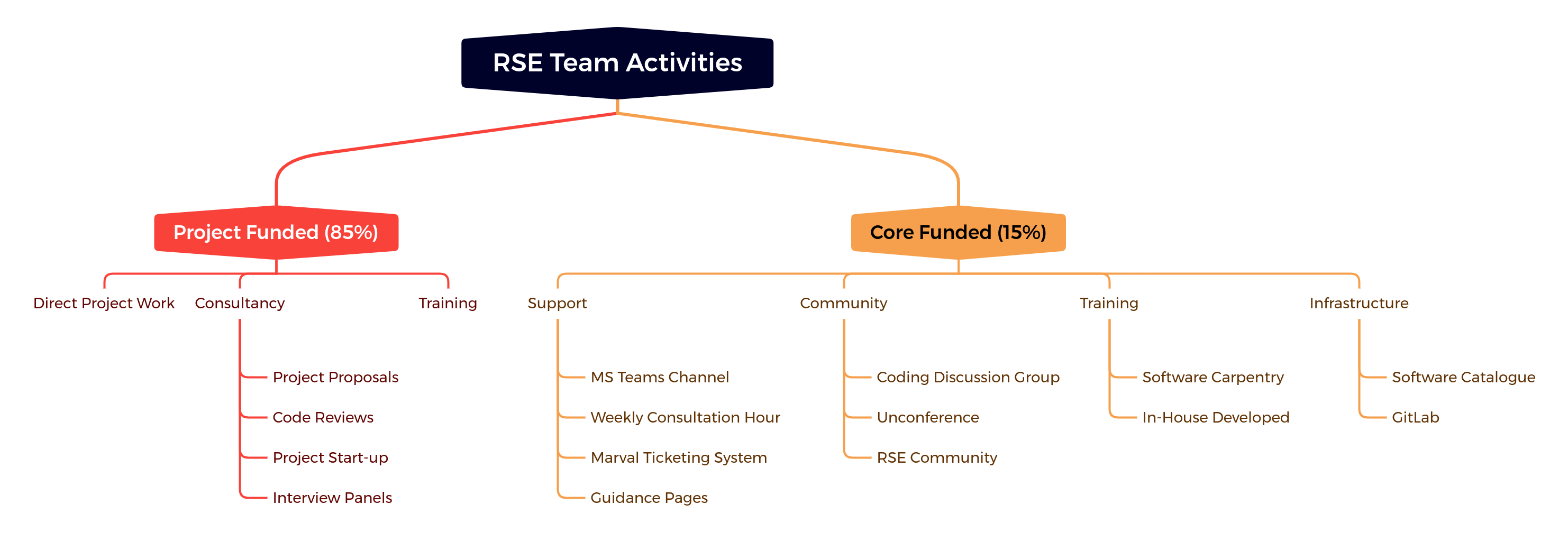
<p>These are not unique to our institution, but it is worth sharing our strategy
and activities for tackling them, which is summarised in the image below.</p>

<p><img src="/assets/images/RSE_Team_Activities.png" alt="UKAEA RSE Team Activities" align="center" />
<em>Bluteau, Matthew (2022): From the Trenches of a Central RSE Team: Successes and Challenges of Promoting Software Sustainability in a Multi-Scale Computational Setting. figshare. Presentation. <a href="https://doi.org/10.6084/m9.figshare.20473515.v1">https://doi.org/10.6084/m9.figshare.20473515.v1</a></em></p>
<p>I suspect like most central RSE teams, our time is predominantly spent on work
funded by the projects of other research groups. It is our bread-and-butter, and
it is truly important work to do. One of the best ways of spreading software
sustainability is practicing what you preach. There is an important subtopic
of this work that I call “consultancy”, which deserves mention because it is one
way that we can directly influence the structure and planning of research
projects so that they consider software sustainability from the beginning rather
than as an afterthought, at which point it is much more difficult to correct
course. We have advised on project funding proposals in the past and sat on
interview panels, both of which plant seeds for future software sustainability.
We have also done one-off code reviews, usually on quite large portions of
existing code bases with the purpose of getting them fit for release. Whilst we
aim to encourage regular code review as part of merge requests in all
substantial software projects, this doesn’t always happen, and it is still
important to support the projects that haven’t adopted this practice yet. This
is a subject close to my heart because it was one of the first “side” projects I
got assigned when I initially started as an RSE and because I have been an
active participant in the <a href="https://dev-review.readthedocs.io/en/latest/">Research Code Review
Community</a>.</p>

<p>Although project-funded work takes up the bulk of our time, I place an equal
importance on the smaller portion of our work that is enabled by some core
funding (the right side of the figure above). Why? Because not being tied to any
particular research project means that we can do work that we believe benefits
<em>all</em> research groups on site, allowing us to start building a research software
infrastructure and baseline that will hopefully make our project work easier
over time. The activities under this core funding umbrella are quite varied, and
I have been lucky enough to participate in most of them. For example, under the
“Community” heading our team runs something called the Coding Discussion Group,
which is a monthly meeting dedicated to research software topics. At the moment,
this takes the format of a short presentation to inspire subsequent discussion,
but in the future, I am hoping to make it more interactive with actual coding
activities to facilitate learning through practice, similar to the “coding club”
Hannah described in her talk. And as Hannah explained, fostering this software
community is a foundational part of good software development because it enables
knowledge and skill exchange.</p>

<p>I would be remiss not to also mention the “Training” subtopic. For over five
years, our team has been delivering the regular Python-based Software Carpentry
Workshop along with some of our own material on automated testing and best
practices. Early this year, <a href="/2022/04/25/review-intermediate-course.html">I lead a successful pilot of the new Carpentries
course “Intermediate Research Software Development in Python”</a>
as the main thrust of my SSI fellowship, and it has now become part of our
regular offering.</p>

<p>It is my hope that this brief summary of my groups activities will be helpful to
other groups in their effort to promote software sustainability.</p>

<h2 id="improving-support-and-recognition-for-research-software-personnel---the-international-landscape"><a href="https://pasc22.pasc-conference.org/program/schedule/index.html%3Fpost_type=page&amp;p=10&amp;id=msa209&amp;sess=sess125.html">Improving Support and Recognition for Research Software Personnel - the International Landscape</a></h2>

<p>Expanding further the scope of consideration, it is necessary to acknowledge
that even central and embedded RSE teams cannot solve all of the problems of
software sustainability because they operate in a global research culture that
still does not adequately value research software as an output. This means these
teams are constantly fighting an up-hill battle and unable to operate at their
full potential. The international action and culture change needed to improve
this situation is what Anna-Lena’s talk addressed.</p>

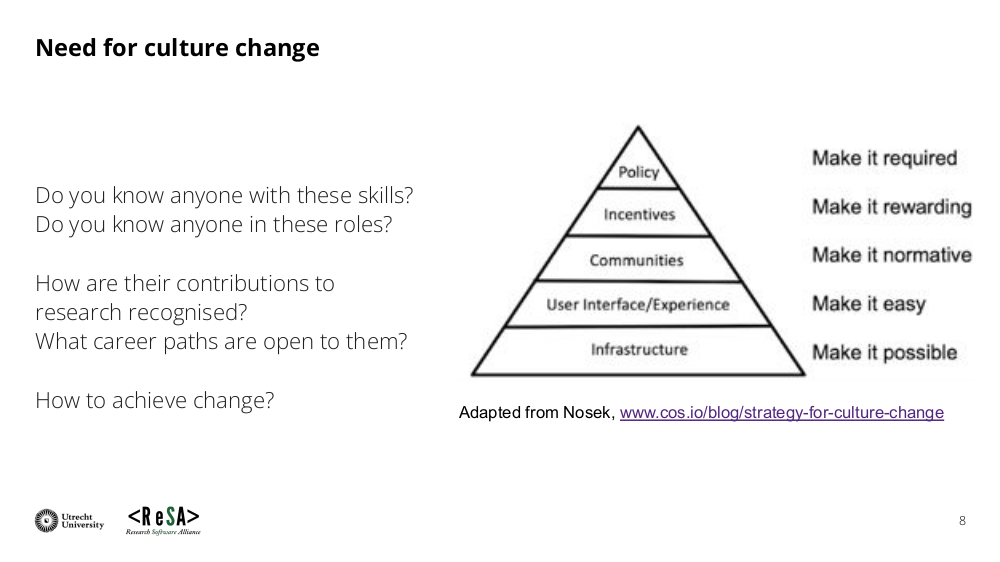
<p>She succinctly gave the roadmap for culture change in the slide below:</p>

<p><img src="/assets/images/lemprecht_improving_support_slide_8.png" alt="Roadmap for culture change by Anna-Lena Lemprecht" />
<em>Lamprecht, Anna-Lena; Barker, Michelle (2022): Improving Support and Recognition for Research Software Personnel - the International Landscape. figshare. Presentation. <a href="https://doi.org/10.6084/m9.figshare.20492739.v1">https://doi.org/10.6084/m9.figshare.20492739.v1</a></em></p>
<p>What I particularly liked was her comment that this is meant to be
simultaneously a bottom-up and top-down approach, something I have long believed
in. At the bottom of the pyramid are the categories of infrastructure and
skills (substitute for “User Interface / Experience” in the figure), which are
slightly different from the infrastructure and training that were mentioned in
my talk above, which was focussed on RSEs providing the services for
researchers. Rather, the infrastructure and skills Anna-Lena is talking about
are specifically to support RSEs. An example of infrastructure she gave was
something like the <a href="https://citation-file-format.github.io/">Citation File Format
(CFF)</a> that easily facilitates the
citation of a code repository, helping RSEs get cited and therefore closer to
proper recognition. This is also something that was produced directly by a few
RSEs. Bottom up approach FTW!</p>

<p>On the skills side, Anna-Lena identified a new group called
<a href="https://intersect-training.github.io/overview/">INTERSECT</a> that is looking at
what skills RSEs specifically need to develop their career. Again, this is
different from more general research software skills that <em>both</em> researchers and
RSEs require, like the foundational common ground the Carpentries has
built. I have not had much contact with this group yet, but I am very interested
in getting involved. It strikes me as a nice mix of both bottom up and top down
approaches. It is supported by the NSF (top-down) but was presumably first
submitted by a group of researchers (bottom-up).</p>

<p>Next in the pyramid is communities, a theme that arose in all three
presentations. This highlights that communities are needed at many different
levels in order to support software sustainability. As RSEs, we are quite lucky
that <a href="https://researchsoftware.org/council.html">an extensive international
network</a> of national RSE societies
has developed with the movement. Wherever you are in the world, there will be a
society you can join as an RSE to get support and network with other RSEs. These
national and international communities are essential because not every
institutions or research area will have an appropriate community for an RSE to
join.</p>

<p>Moving one more level up the pyramid, we come to incentives. I think incentives are
closely linked with recognition, and this is confirmed by the fact that
Anna-Lena mentioned things like the <a href="https://hidden-ref.org/">Hidden REF</a> and
progress in the Netherlands towards considering all outputs (including software)
when making decisions about hiring and promotion. Ultimately, software
sustainability depends in large part on RSEs being widespread in research, and
that can only happen when they are properly recognised and rewarded for their
contributions to research.</p>

<p>Finally, at the top of the pyramid for creating culture change is policy, which
encapsulates most of the “top-down” aspects of this framework. It is the
policies of funding bodies, universities, and publishers that create the
environment in which research culture forms, meaning there is only so much that
research culture can deviate from the limits enforced by this policy
environment. Concerted advocacy and lobbying over many years will be needed, and
Anna-Lena pointed out organisations doing this work like the Research Software
Alliance (ReSA), Software Sustainability Institute (SSI), and the <a href="https://www.force11.org/group/software-citation-implementation-working-group">FORCE11
Software Citation Working
Group</a>.
I would add that many national RSE societies are also engaged in policy
advocacy, a specific example being the discussions that SocRSE have had with
funding bodies in the UK.</p>

<hr />

<div class="footnotes" role="doc-endnotes">
  <ol>
    <li id="fn:data" role="doc-endnote">
      <p>Those paying attention will notice that data sustainability is in the
title but not really mentioned elsewhere in the post. This is because the
session itself really focussed on the software side of this problem.
Historically, there has been much more done on the data side (e.g. FAIR
principles) in research than the software side, so it feels natural there
has been a shift. Obviously, the two are intertwined, and both require the
success of the other to fully achieve their aims. <a href="#fnref:data" class="reversefootnote" role="doc-backlink">&#8617;</a></p>
    </li>
  </ol>
</div>]]></content><author><name>Matt</name></author><category term="PASC" /><category term="conference" /><category term="PASC22" /><category term="software-sustainability" /><category term="testing" /><category term="code-review" /><summary type="html"><![CDATA[]]></summary></entry><entry><title type="html">Review of Piloting a New Course: Intermediate Research Software Development in Python</title><link href="/2022/04/25/review-intermediate-course.html" rel="alternate" type="text/html" title="Review of Piloting a New Course: Intermediate Research Software Development in Python" /><published>2022-04-25T00:00:00+00:00</published><updated>2022-04-25T00:00:00+00:00</updated><id>/2022/04/25/review-intermediate-course</id><content type="html" xml:base="/2022/04/25/review-intermediate-course.html"><![CDATA[<p>At the end of January and beginning of February this year (2022), I piloted a
new course at my institution which sought to teach <em>intermediate</em>-level software
development skills to researchers. In the immediate aftermath, I posted a short
thread of tweets on Twitter to share some of the experience of running the course.</p>

<blockquote class="twitter-tweet"><p lang="en" dir="ltr">Last Wednesday, I finished delivering a pilot of a new course at <a href="https://twitter.com/UKAEAofficial?ref_src=twsrc%5Etfw">@UKAEAOfficial</a> with the help of two colleagues from <a href="https://twitter.com/RSECulham?ref_src=twsrc%5Etfw">@RSECulham</a> (Kristian Zarebski and Sam Mason). Some initial impressions and further details... 🧵</p>&mdash; Matthew (@mattasdata) <a href="https://twitter.com/mattasdata/status/1490649293497196557?ref_src=twsrc%5Etfw">February 7, 2022</a></blockquote>
<script async="" src="https://platform.twitter.com/widgets.js" charset="utf-8"></script>

<p>Understandably, this thread conveyed my initial impressions of how the course
went, but a further and more in-depth analysis was always planned. So, here I am
to make good on that intention and pick apart the course delivery, successes,
and challenges in more detail. I’ll be quoting the content from the thread below
because it introduces much of what I want to discuss. The target audience for
this post is other people who want run this course at their institution.</p>

<p>The course is titled “Intermediate Research Software Development in Python” and
you can find <a href="https://carpentries-incubator.github.io/python-intermediate-development/">all of the material freely
online</a>.
It is important to clarify that this is a course about software engineering
practices and not more advanced features of Python. Python is merely the sandbox
in which to demonstrate and learn the intermediate-level skills relevant to
<em>most</em> forms of research software development in all languages.</p>

<h2 id="context-and-motivation">Context and Motivation</h2>

<blockquote>
  <p>❓Why? This was hatched as part of my SSI fellowship proposal. I identified a gap
between what is taught by the essential, introductory @SoftwareCarpentry courses
and the skills that researchers at my lab require day-to-day. Things like IDE
use, automated testing, virtual environments, project structure and design, etc.
The material developed by the SSI overlapped almost perfectly with these
needs.</p>
</blockquote>

<p>There isn’t much to add to this, except my own personal journey of learning the
necessary software development practices for being a researcher. A Software
Carpentry workshop at the beginning of my PhD gave me a solid foundation to work
from, but I quickly found that the code for my research would require more than
a novice understanding of version control, the Unix shell, and Python. Although
I enjoyed independently learning about software engineering during my PhD, I often felt
uncertain about where to find authoritative content on how researchers should be
developing their code at an intermediate-to-advanced level. Sure, StackOverflow
is great, but it doesn’t provide development path for someone follow. What is
important to learn, and what should be the order of those topics? The
shortcomings were obvious: I completed my PhD having never done, let alone heard,
about automated software testing, and my approach to design and architecture was
<em>ad hoc</em> and completely shaped by the code within my research group. Given how
important I think testing is for software and the fact I was developing library
codes, that was simply not acceptable—but certainly not all my fault!!!</p>

<p>A direct consequence of this personal shortcoming was my desire to rectify it
for other present and future researchers, and hence, when I moved into an RSE
role, I finally had the time and resources to direct towards achieving that
through the delivery of training courses. This culminated in my SSI Fellowship
2021 and the formalisation of a plan to delivery an <em>intermediate</em>-level course
at UKAEA.</p>

<p>Now you know why, so let’s get down to the practicalities of the course.</p>

<h2 id="scheduling">Scheduling</h2>

<blockquote>
  <p>📅 Scheduling? The course was run over four separate, half-day sessions in the
afternoon, split equally across two weeks (Tuesdays and Wednesdays). This was by
far the preferred format from the post-workshop survey.  It gave learners the
time blocks they needed to focus on the material, while allowing flexible time
between sessions to digest material and catch-up if needed.</p>
</blockquote>

<p>These comments still hold true, but it is nice to see the other options that
learners were choosing from, and how they ranked them following the course:</p>

<p><img src="/assets/images/scheduling_rank.png" alt="" /></p>

<p>The second choice is “4 afternoon sessions, 1 session per week”. I can see this
being suited to advanced learners who simply want a quick introduction at the
beginning and then just sit in breakout rooms with some helpers as they read
through the material and do the exercises. These are also the learners who tend
to have busier schedules, likely being higher up the seniority ladder, and
therefore a single session per week is much less of a time commitment. Although
I see the potential value of this scheduling, it is unlikely we will shift to it
unless it is clear more learners want it.</p>

<p>The third option is “4 afternoon sessions, all in the same week”. My main
criticism of this is that it would make for quite an intense week, and the
likelihood of scheduling conflicts increases greatly: someone is going to have a
weekly meeting that clashes with one of the slots. While it isn’t fatal to step
out of one of the sessions for a meeting, the process of catching up puts a
strain on both learners and helpers/instructors.</p>

<p>It is quite interesting that both of the “full day” options came in at the
bottom. Combined with the long form comments in the feedback, it is obvious that
learners appreciated having the morning half of the day to use as they pleased,
whether that be for usual work, or catching up on course content from the
previous day. The same can be said about having the course split across two
weeks: the interim time could be used for catch-up.</p>

<p>However, it is important to acknowledge the potential bias in the answers to
these questions. Participants have only directly experienced one of the
schedule formats, so they will undoubtedly tend to prefer that scheduling.
Regardless, it is fair to conclude that they did not <em>dislike</em> the format nor
was it inconvenient.</p>

<h2 id="teaching-format">Teaching Format</h2>

<blockquote>
  <p>📑 Format? A previous pilot of the course I helped with used longer breakout
rooms for entire sections of the course with learners reading through the
material. While this worked well, I wanted to see if a bit more instructor-led
content might improve things further. So, I created a set of Jupyter-notebook
slides to accompany the course website content:
<a href="https://github.com/ukaea-rse-training/python-intermediate-development/tree/ukaea-instructor-led/slides">https://github.com/ukaea-rse-training/python-intermediate-development/tree/ukaea-instructor-led/slides</a>
Free for anyone to use. These give some guidance for introducing individual
episodes, when to send learners into breakout rooms, and what material they
should cover.</p>
</blockquote>

<p>What I critically failed to mention was that in both cases the courses were run
completely remotely via Zoom, and also in both cases breakout rooms played an
essential role in the delivery of the course. It is important to clarify some
terminology as well: a section is the top level division of the course, and each
section is composed of episodes.</p>

<p>Therefore, the two key difference in the format of delivery was first the use of
slides to introduce each episode and in some cases eliminate the need for
learners to read content, and second the length and number of breakout room
sessions. I like to think of the main difference being in terms of the frequency
of “synchronisation” points. In the case of the UKAEA course that I instructed,
the synchronisation between breakout rooms tended to happen at the beginning and
end of each <em>episode</em>, whereas the SSI delivered courses are synchronised at the
beginning and end of each <em>section</em>. Again, these are both equally valid
approaches that I think have their respective merits and drawbacks.</p>

<p>What I like about the more frequent and shorter breakout rooms is that it
contributes to a cohesive and collective feel to the course. If the
breakout rooms are long, then it is effectively like each breakout room
has their own unique experience of the course that isn’t shared with the other
groups. By returning to the main room more frequently to go over some high-level
concepts and share discussions from the breakout rooms, there is more collective
experience of the material.</p>

<p>On the other hand, more frequent synchronisation means that advanced learners
will more often be kept waiting in breakout rooms with dead time, even though
the total amount of time they might wait is the same in either case. In the
single breakout session per section format, advanced learners have a single
block of time during which they might wait, and they can more effectively put
that time to good use rather than the salami slicing that happens in the other format.</p>

<p>Moreover, whilst there was a lot of valuable discussion from the “report out” at
the end of breakout sessions, it did throw off the timing of the course, so
there will need to be some further reflection about whether it will be possible
to continue to do this in future iterations or how it might be fit in better.</p>

<p>Overall, the feedback supports that the teaching style with slides was
effective. The graph below shows the level of agreement with the statement “The
mix of instructor-led tuition and independent study and exercises was
effective”, with 1 = completely disagree and 5 = completely agree.</p>

<p><img src="/assets/images/int_course_feedback_tuition_mix_likert.png" alt="" style="display:block; margin-left:auto; margin-right:auto" /></p>

<p>Asking a slightly different question showed similar results: “If the current
delivery of the course was said to represent a “5” on the scale below, where do
you think the balance of instructor-led to independent study should be for the
course? (0 - more instructor led, 10 - more independent study)”</p>

<p><img src="/assets/images/int_course_feedback_more_instructor_led_likert.png" alt="" style="display:block; margin-left:auto; margin-right:auto" /></p>

<p>This figures suggests there might be a slight preference for their being
more instructor-led components for the course, but likely the sample size is not
large enough to firmly conclude this. Based on written feedback, it seems the
main reason for why the instructor-led components were valuable was because they
eliminated some of the reading required from the main course pages. Reading
fatigue is one common point of feedback from the few iterations of this course
I have helped with.</p>

<p>Another important component of the course was a shared Markdown document. This
is fairly standard practice for Carpentries courses, but it is worth remembering
that even more advanced learners can still find this tool useful. In fact,
because there is even more detail and breadth of topics at an intermediate
level, it could be argued that a document like this is even more important
because it allows for references and short explainers to be added for which
there were simply not enough time for in the course itself. Also, the
shared document was used to outline the the exercises that would be done during
the course, giving learners an overview through which they could browse and
consult if they every lost the thread of the course. I am hoping to include a
markdown template in the course materials at some point in the future.</p>

<p>Finally, a comment about what is to come. Moving to in-person learning will
require some adaptation. Zoom breakout rooms are actually somewhat difficult to
recreate in real life. Having seating arrangements that allow participants to be
in small groups but then also access the slides delivered by the instructor is
non-trivial. So, there needs to be thought about which venue is being booked for
the training.</p>

<h2 id="feedback">Feedback</h2>

<blockquote>
  <p>💬 Feedback? We collected daily feedback from learners, and from initial
inspection it is overwhelmingly positive. The breakout rooms with helpers was a
consistent feature that learners found helpful. Some preferred a verbal delivery
of the contents (i.e. using the slides) while others were quite impressed with
the website content and happy to read through themselves whilst asking questions
in breakout rooms. It is likely we will alternate between both formats in the
future.</p>
</blockquote>

<p>Having reviewed the full feedback, it is likely we will stick solely with the
slide-based delivery of this course. To accommodate different learner pace, we
will instead try to get some “additional exercises” into the course content that
advanced learners can do while they wait. This feature has come up in other
sessions of the course I have helped with, so it is likely to happen.</p>

<p>Universally, the content was seen to be useful and appropriately targeted.
However, Section 3 (Software Architecture and Design) of the course does deserve
some special mention. This is undoubtedly one of the more content dense
sections, with modules on programming paradigms like Object-Oriented (OO) and
Functional Programming. The figures show that this was perceived to be too much detail,
slightly more difficult, and probably not quite what learners where expecting.</p>

<p><img src="/assets/images/int_course_feedback_sections_likert.png" alt="" style="display:block; margin-left:auto; margin-right:auto" /></p>

<p>The lesson developers are aware of this from other runs of the session, so I am
certain this will get ironed out in the long run. The main way that I will seek
to mitigate this in the short term is to give more time for this section, whilst
perhaps starting to make an attempt at unifying the exercises from the
functional and OO episodes with the main “inflammation” project that is used in
the rest of the content.</p>

<h2 id="improvements">Improvements</h2>

<blockquote>
  <p>📈 Improvements? VSCode seems to be a more popular editor at our institution, so
we want to adapt the material to that.  Keeping to time was difficult. It is
likely the course needs one or two extra half-day sessions when delivered like
this.</p>
</blockquote>

<p>There is certainly still the desire to get the lesson material compatible with
VSCode users. I am hoping to address this prior to the next iteration of the
course in May.</p>

<p>For this next run, I have added an additional half-day session (5 half-day
sessions in total), to ease the time constraints slightly. This is also more in
line with how the course authors are now running the course.</p>

<h2 id="acknowledgements">Acknowledgements</h2>

<p>It imperative that I thank some important people who made
this possible. First, the original authors of the course material, Aleks
Nenadic, Steve Crouch, and James Graham from the <a href="https://software.ac.uk/">Software Sustainability
Institute (SSI)</a> deserve huge credit for developing
this incredible resource and making it freely available for all to use. Second,
my two colleagues from the UKAEA RSE Team, Kristian Zarebski and Sam Mason, have
my gratitude for being helpers of the course and ensuring the breakout rooms
were such a valuable learning environment.</p>]]></content><author><name>Matt</name></author><category term="training" /><category term="research-software" /><category term="RSE" /><category term="intermediate-level" /><category term="python" /><summary type="html"><![CDATA[At the end of January and beginning of February this year (2022), I piloted a new course at my institution which sought to teach intermediate-level software development skills to researchers. In the immediate aftermath, I posted a short thread of tweets on Twitter to share some of the experience of running the course.]]></summary></entry><entry><title type="html">Notes from the SSI Collaborations Workshop 2022</title><link href="/2022/04/11/ssi-cw22-notes.html" rel="alternate" type="text/html" title="Notes from the SSI Collaborations Workshop 2022" /><published>2022-04-11T00:00:00+00:00</published><updated>2022-04-11T00:00:00+00:00</updated><id>/2022/04/11/ssi-cw22-notes</id><content type="html" xml:base="/2022/04/11/ssi-cw22-notes.html"><![CDATA[<p>Below are my lightly touched up notes from the SSI (Software Sustainability Institute) Collaborations Workshop 2022.</p>

<p><a href="https://ssi-cw.figshare.com/Collaborations_Workshop_2022_CW22">Figshare portal with all of the presentation materials from lightning talks, keynotes, etc</a></p>

<h2 id="day-1">Day 1</h2>

<p><a href="https://www.youtube.com/watch?v=EHyEsZCDR1U">Both keynotes available on YouTube</a></p>

<p><a href="https://docs.google.com/document/d/1gMPHvGkO-CWdNro_zW9N8KrWj_6xypc1XKOv0MFA7g8/edit#">Collaborative notes with lots of useful links to other content from the sessions</a></p>

<h3 id="keynote-on-code-review">Keynote on Code Review</h3>

<ul>
  <li>Slightly misnamed because it was actually about code verification for publications</li>
  <li>“Code execution during peer review”</li>
  <li>Daniel Nust (Researcher, Institute for Geoinformatics, Uni of Munster)</li>
  <li>Talking about <a href="https://codecheck.org.uk/">CODECHECK</a> and then <a href="https://reproducible-agile.github.io/">Reproducible Agile</a> (which is confusingly something for geoinformatics and not the project management methodology)</li>
  <li>Slides: <a href="https://codecheck.org.uk/slides/cw22-keynote-daniel-nuest.html">https://codecheck.org.uk/slides/cw22-keynote-daniel-nuest.html</a></li>
  <li>The PDF produced for publication do not facilitate reproducibility and are poor representations of what happens leading up to publication and the scientific method (in computational science)</li>
  <li>To rectify, there have been a number of efforts to check code output that have popped up, basically to check that the code associated with a paper can actually be run and not necessarily whether it produces accurate scientific results
    <ul>
      <li>so this is more about reproducibility</li>
    </ul>
  </li>
  <li>ReproHack is something associated to this</li>
  <li>Some interesting questions about how this initiative also relies on the free labour of academics
    <ul>
      <li>the answer to this was that at least the free labour wouldn’t be supporting a parasitic for-profit publishing company</li>
    </ul>
  </li>
</ul>

<h3 id="keynote-on-ethics">Keynote on Ethics</h3>

<ul>
  <li>Pamela Ugwudike</li>
  <li>IEEE Global Initiative’s mission: ensure every stakeholder involved in the design and development of autonomous systems is trained in and able to prioritise ethics and benefit to humanity</li>
  <li>“new and emergent software should do no harm” – the Hippocratic Oath for SE and AI/ML
    <ul>
      <li>but who decides harm?</li>
      <li>there needs to be an approach rooted in the context of where the software will be applied to determine the ethical norms applied in the software</li>
    </ul>
  </li>
  <li>Concept of “Digital Capital”
    <ul>
      <li>another (newish) form of power in our society</li>
      <li>those with digital literacy and software development skills increasingly dictate many social processes</li>
    </ul>
  </li>
</ul>

<h3 id="lightning-talks">Lightning Talks</h3>

<ul>
  <li>Rebecca Grant (F1000) - Making an impact: Software Tools Articles at F1000 Research
    <ul>
      <li>The software tools article is a new journal article type that focuses on the software tool and not the scientific result</li>
    </ul>
  </li>
  <li>How green is an event?
    <ul>
      <li>CO2 calculator for individual attending an event: <a href="https://cutt.ly/rg-co2-calculator">https://cutt.ly/rg-co2-calculator</a></li>
      <li>not the quickest calculator when I tried…</li>
      <li>github.com/RemotelyGreenOrg</li>
    </ul>
  </li>
  <li>Eli Chadwick
    <ul>
      <li>FAIR data analysis in muon science</li>
      <li>using a tool called <a href="https://galaxyproject.org">Galaxy</a></li>
    </ul>
  </li>
</ul>

<h3 id="discussion-session">Discussion Session</h3>

<ul>
  <li>Notes document: <a href="https://docs.google.com/document/d/1Y7oEgNskVznSJDu7PDLaEeHi-cPvTb8C_DzogPYVcWA/edit#">https://docs.google.com/document/d/1Y7oEgNskVznSJDu7PDLaEeHi-cPvTb8C_DzogPYVcWA/edit#</a></li>
  <li>The theme for our group was: “What are the practicalities of introducing researchers to code review?”</li>
  <li>Some interesting perspectives from a PhD student in a group that is very hostile to anything that focuses on software sustainability
    <ul>
      <li>it is seen as wasting time because it doesn’t result in publications</li>
      <li>as a result, we talked a lot about the current academic culture and it near complete reliance upon publications as a metric for reward and assessment</li>
      <li>it was acknowledged that this student simply has to take the personal hit of focussing on the software, and the impact upon relationship with PI and career advancement</li>
    </ul>
  </li>
  <li>There is then the time constraints that researchers operate under, and adding code review is yet another item on the list
    <ul>
      <li>consequently, there needs to be a strong sell on the benefits, and long term this is something that needs to be written into job descriptions</li>
      <li>one group member mentioned that they did have a central RSE team available, but it could take about 6 months to get a code review done!!!
        <ul>
          <li>so, have flexible RSE teams that can take these sort of short term projects is important</li>
        </ul>
      </li>
    </ul>
  </li>
  <li>We eventually got around to writing a blog post looking at some of the barriers for introducing code reivew
    <ol>
      <li>Time commitment (above)</li>
      <li>Willingness and culture (above)</li>
      <li>Finding reviewers: it isn’t always possible to get someone from your group, and venturing outside your group will run into a host of issues</li>
      <li>Clarifying the goals of the review
        <ul>
          <li>there can’t be an expectation of doing a complete verification of the code base (this is more for testing)</li>
        </ul>
      </li>
    </ol>
  </li>
  <li>Sidebar great idea from someone in the room: do a project Euler problem each month and then share the solutions to that
    <ul>
      <li>a way to diminish code shyness</li>
      <li>could be good for CDG???</li>
    </ul>
  </li>
</ul>

<h2 id="day-2">Day 2</h2>

<p><a href="https://docs.google.com/document/d/1kMad_Yv-mCdYslyhIPZzutTE0pz4opoAoTuQmOExV48/edit#">Collaborative notes</a></p>

<h3 id="panel-on-ethics">Panel on Ethics</h3>

<ul>
  <li>Case study about where ethics was not applied or considered
    <ul>
      <li>in Nairobi, there was a live “experiment” of trying to discover how to get landlords in Nairobi to pay their water bill</li>
      <li>it ended up with people living in these buildings having their water cut for 9 months or so</li>
      <li>the researchers wanted to see if the tenants would have the bargaining power to force their landlord to pay the water bill, without considering the fact that these are already marginalized people with little power</li>
    </ul>
  </li>
  <li>ethics is not just a box-ticking exercise, not ‘one and done’</li>
  <li>it is important that ethics has the power to stop a study!</li>
  <li>researchers are not passive participants in the research and need to consider ethics from the beginning, not just as some requirement put on them</li>
  <li>mention of how Turing Way has contracts that include contribution to open source</li>
  <li>“reflexive” (reflective?) documentation exercises
    <ul>
      <li>ways to identify stakeholders and thinking about them</li>
      <li>what they didn’t get to was how to engage with stakeholders (in particular those who the software and research will impact)</li>
    </ul>
  </li>
  <li>RSEs in particular might be brought into a project where the ethics have already been cleared
    <ul>
      <li>it is essential to raise any concerns even at this “late” juncture</li>
    </ul>
  </li>
  <li>MTurk workers are a form a of Data Enhancement Workers, and there are ethical considerations around the fact that they are not given much credit in the results of ML (nor compensated well by companies that benefit from the ML systems)</li>
</ul>

<h3 id="collaborative-ideas-session">Collaborative Ideas Session</h3>

<ul>
  <li>Our group was in the “Interdisciplinary” category but we ended up being a bunch of Physicists and HPC people 😅️ (with one Biologist!)</li>
  <li>After a meandering discussion, we eventually landed on the idea of “Code Review Cupid”</li>
  <li>Problem: Finding code reviewers is difficult. Code reviewing when there are more researchers than RSE is not sustainable, so there needs to be leveraging of researchers reviewing the code of other researchers</li>
  <li>Solution: create a matchmaking service for researchers looking to review code and have their code reviewed
    <ul>
      <li>researchers/coders would create a profile with some basic relevant skill sets collected into a small database</li>
      <li>use a matching algorithm to make suggestions to both reviewers and coders</li>
      <li>supporting resources on how to perform code review</li>
    </ul>
  </li>
</ul>

<h3 id="lightning-talks-2">Lightning Talks 2</h3>

<ul>
  <li>Stephan Druskat
    <ul>
      <li>metadata for software publication</li>
      <li><a href="http://software-metadata.pub/">http://software-metadata.pub/</a></li>
    </ul>
  </li>
  <li>M-x Research
    <ul>
      <li>a support group for emacs users in research software</li>
      <li><a href="https://m-x-research.github.io/">https://m-x-research.github.io/</a></li>
    </ul>
  </li>
  <li>Datalad: basically like better Git-LFS???
    <ul>
      <li>sort of, but built on git-annex and is meant to solve the higher-level problem of tracking a data object throughout a workflow</li>
      <li><a href="https://datalad.org">https://datalad.org</a></li>
    </ul>
  </li>
  <li>Building bridges in Matrix
    <ul>
      <li>I should really join this: <a href="https://joinmatrix.org/guide/">https://joinmatrix.org/guide/</a></li>
    </ul>
  </li>
</ul>

<h3 id="miniworkshopdemo-session-1">Miniworkshop/Demo Session 1</h3>

<ul>
  <li>I helped run a feedback session on the website produced by the Code Review Community about doing code review during research (of which I was a main contributor)</li>
  <li>Website: <a href="https://researchcodereviewcommunity.github.io/dev-review/">https://researchcodereviewcommunity.github.io/dev-review/</a></li>
  <li>Notes document: <a href="https://docs.google.com/document/d/1bmb-qfRJAPFB4y5d1DTvVYwk3mcVCE1PI971oikMaEw/edit#">https://docs.google.com/document/d/1bmb-qfRJAPFB4y5d1DTvVYwk3mcVCE1PI971oikMaEw/edit#</a></li>
  <li>Intro to the session and the website: <a href="https://researchcodereviewcommunity.github.io/CW2022-miniworkshop/slides.html#/title-slide">https://researchcodereviewcommunity.github.io/CW2022-miniworkshop/slides.html#/title-slide</a></li>
  <li>Main portion was going into breakout rooms
    <ul>
      <li>first 10 minutes was reading a portion of the website
        <ul>
          <li>Finding a Reviewer</li>
          <li>Meet and Agree on Objectives</li>
          <li>Code Author Communicates Code and Context</li>
          <li>Reviewer Reviews Code</li>
          <li>Author and Reviewer Meet</li>
        </ul>
      </li>
      <li>then, we had some targeted questions to spark discussion (and gather feedback)</li>
    </ul>
  </li>
  <li>Result: some really great ideas for improving the website and our presentation of code review for researchers
    <ul>
      <li>e.g. creating a markup of a piece of code with reviewer comments, creating some videos of good and bad tone from a reviewer during a meeting</li>
    </ul>
  </li>
</ul>

<h2 id="day-3">Day 3</h2>

<h3 id="miniworkshopdemo-session-2">Miniworkshop/Demo Session 2</h3>

<h4 id="technical-debt-talk">Technical Debt Talk</h4>

<ul>
  <li>notes doc: <a href="https://docs.google.com/document/d/1dry3-jF_SD4TANIxu-RYv4CBA74q6leCodyBWfsgEqI/edit">https://docs.google.com/document/d/1dry3-jF_SD4TANIxu-RYv4CBA74q6leCodyBWfsgEqI/edit</a></li>
  <li>big take home was opening up to refactoring and being more agile</li>
  <li>something interesting to check out: <a href="https://hyperpolyglot.org">https://hyperpolyglot.org</a></li>
</ul>

<h4 id="common-workflow-language-novice-tutorial">Common Workflow Language Novice Tutorial</h4>

<ul>
  <li>notes: <a href="https://docs.google.com/document/d/11YeLNc40MI1U-wdZCe2uqlFGfinkZgiWUzMioq0cyRY/edit#">https://docs.google.com/document/d/11YeLNc40MI1U-wdZCe2uqlFGfinkZgiWUzMioq0cyRY/edit#</a></li>
  <li>basically, a yaml based language for creating data analysis workflows</li>
  <li>interesting, but there were some execution and timing problems with the demo</li>
  <li>the input language itself is a bit repetitive</li>
  <li>are workflow constructions more suited to GUI?</li>
</ul>]]></content><author><name>Matt</name></author><category term="ssi" /><category term="conference" /><category term="cw22" /><category term="CollabW22" /><summary type="html"><![CDATA[Below are my lightly touched up notes from the SSI (Software Sustainability Institute) Collaborations Workshop 2022.]]></summary></entry><entry><title type="html">Testing in Research Software: Review of ICCS 2021 Part 2 and SeptembRSE</title><link href="/2021/11/29/iccs-part2-and-testing.html" rel="alternate" type="text/html" title="Testing in Research Software: Review of ICCS 2021 Part 2 and SeptembRSE" /><published>2021-11-29T00:00:00+00:00</published><updated>2021-11-29T00:00:00+00:00</updated><id>/2021/11/29/iccs-part2-and-testing</id><content type="html" xml:base="/2021/11/29/iccs-part2-and-testing.html"><![CDATA[<p>On 16-18 June 2021, I attended the <a href="https://www.iccs-meeting.org/iccs2021/">International Conference on Computational
Science (ICCS) 2021</a> and subsequently
wrote <a href="/2021/07/28/iccs-review-part1.html">a post</a> summarizing the first part
of the Software Engineering for Computational Science (SE4Science) track. True
to my word, I am back to complete the review of that track. The remaining part
consisted of a speed blogging session, and my group focussed on software
testing. Before ploughing ahead, it is worth mentioning that a lot of time has
passed since this session, and notably the annual RSE conference returned in
online form as <a href="https://septembrse.society-rse.org/">SeptembRSE</a>.
Unsurprisingly, there was also an event at SeptembRSE that touched on software
testing, so it seems natural to hit two birds with one stone and briefly
review that event as well.</p>

<h2 id="speed-blogging-at-se4s-track-of-iccs">Speed Blogging at SE4S Track of ICCS</h2>

<p>The notes from the speed blogging session are openly available in <a href="https://docs.google.com/document/d/1_KxR_iJmibwZz767Qw6QxTGIrr2fArSAZQQm94TLRAA/edit?usp=sharing">a Google
Doc</a>.
Like many such sessions, we took quite a winding road across a variety of
subjects, but I think predominantly we grappled with the question of how to
make software testing, and particularly automated testing, accessible and
relatable to researchers who already spend time on scientific verification and
validation of their codes. Evidently, this is a large subject to unpack, but
ultimately we decided to narrow down to a single factor that could help
accessibility: expectations.</p>

<p>There are myriad different forms of software
testing out there, and if a researcher or RSE doesn’t know which type of
testing is appropriate for the software they are writing, then they will become
overwhelmed with the options available and simply not do it. As a result, we
came up with the idea of having a chart/table that provides a guide for what
types of testing are expected at different <em>maturity levels</em> of research
software. Breaking down <em>maturity levels</em> is somewhat arbitrary but an
important task when communicating expectations. We ended up using something
quite close to the <a href="https://rse.dlr.de/guidelines/00_dlr-se-guidelines_en.html#anwendungsklassen">DLR Application Classes</a>:</p>

<ul>
  <li>Level 0: Personal use</li>
  <li>Level 1: Research within a team</li>
  <li>Level 2: Supported library for research community</li>
  <li>Level 3: Product formally released to broad audience</li>
  <li>Level 4: Critical application for operation</li>
</ul>

<p>After agreeing on these levels, we then started to assign different testing
types to the levels <em>and to the transitions between levels</em>. What eventually
resulted after some tidying up by Neil Chue Hong is this table.</p>

<figure>
<img src="/assets/images/table_ii_framework_for_understanding_research_software_sustainability.png" alt="Table II Research Software Testing" style="width:100%" />
<figcaption align="center"><i>Table II from Chue Hong, Neil Philippe, Bluteau, Matthew, Lamprecht, Anna-Lena, &amp; Peng, Zedong. (2021). A Framework for Understanding Research Software Sustainability. Collegeville Workshop 2021, Online. Zenodo. https://doi.org/10.5281/zenodo.4988277 
<a rel="license" href="http://creativecommons.org/licenses/by/4.0/"><img alt="Creative Commons License" style="border-width:0" src="https://i.creativecommons.org/l/by/4.0/88x31.png" /></a>.</i>
</figcaption>
</figure>

<p>For me, it is the leftmost column “Testing Approaches” that delivers the
practical value. It tells a miniature story about how the testing should evolve
as your software project matures. It starts in a familiar place for personal
software projects at level 0: do some manual and interactive checking of the
results from your code against some sort of oracle or reference. This is what
all researchers already do; however, as soon as the use of the software expands
beyond the individual, there needs to be work towards formalising tests in the
software. For example, you want to share an analysis routine you just wrote
with someone in your research group. Before you do that, this chart suggests
that you write <em>something</em> that tests your routine. It doesn’t need to be a
test using a formal testing framework, but there should be <em>something</em> codified
to test that the routine works correctly. It could be a script that provides
some well studied input and output to your routine and against which the user
can verify that the numbers match what they get.</p>

<p>This might sound like a lofty ideal that no researcher is ever going to have
time for, but think about it more. When you share your code, you are going to
need to provide some instructions about use and expected output. It is not that
far of a leap to provide a script that does this, at which point you basically
have a software test. Moreover, there is whole lot that can go wrong between
you sharing a piece of software and someone else using it on their own machine.
Having some form of test gives you the piece of mind that the software goblins
aren’t plotting to ruin your day sometime in the future.</p>

<p>Naturally, if your software progresses further and continues to mature, then
the software tests should concurrently increase in formality. There will
obviously be differences of opinion about where the thresholds for different
types of testing lie, but generally I quite like where we arrived at as a group
in our discussion. I would like to see testing frameworks being used in
software that was written for a publication, but in this era of publish or
perish, I understand that this is an unreasonable expectation. However, once
the software escapes the confines of a single research group, the expectation
for automated testing then becomes reasonable.</p>

<h2 id="discussion-on-testing-at-septembrse">Discussion on Testing at SeptembRSE</h2>

<p>Everything above is immediately relatable to the discussion session at
SeptembRSE titled “Is testing overkill for most research software? How can we
make it easier to test scripts?”. You can watch the full session on YouTube:</p>

<iframe width="560" height="315" src="https://www.youtube-nocookie.com/embed/9084fOirQYo?start=926" title="YouTube video player" frameborder="0" allow="accelerometer; autoplay; clipboard-write; encrypted-media; gyroscope; picture-in-picture" allowfullscreen=""></iframe>

<p>To tersely summarise the response to the first question in the title,
participants quite uniformly said, “No. Testing is not overkill”. Of course,
the response to that question depends on what type of testing one is talking
about.  A full suite of automated unit, integration, and system tests in a
testing framework that is run in CI is probably overkill for a lot of research
software, especially the projects at level 0 and 1 above. Indeed, the
participants in the discussion did acknowledge there is a varying degree of
software testing dependent on the maturity of the project, which largely agrees
with the table we created above.</p>

<p>On the question of how to make it easier to test research software, there was
one answer that stood out for me, and I will paraphrase it as “write tests
early and often”. The earlier you start writing tests, the easier it will be
compared to further down the line. This is because testing has a
direct positive influence upon the design of your software. Unit tests in
particular force you to write small reusable pieces of code, and if you find it
difficult to test something you have written, that is probably because it
exhibits some pathology of poor design.</p>

<p>Whilst I do really agree with this answer, I think it also needs to be tempered
with the reality of how research is conducted, and in that respect I once again
point to the table created above for what should ultimately guide researchers
and RSEs when writing tests for their research software.</p>]]></content><author><name>Matt</name></author><category term="iccs" /><category term="conference" /><category term="se4science" /><category term="computational-science" /><category term="septembrse" /><summary type="html"><![CDATA[On 16-18 June 2021, I attended the International Conference on Computational Science (ICCS) 2021 and subsequently wrote a post summarizing the first part of the Software Engineering for Computational Science (SE4Science) track. True to my word, I am back to complete the review of that track. The remaining part consisted of a speed blogging session, and my group focussed on software testing. Before ploughing ahead, it is worth mentioning that a lot of time has passed since this session, and notably the annual RSE conference returned in online form as SeptembRSE. Unsurprisingly, there was also an event at SeptembRSE that touched on software testing, so it seems natural to hit two birds with one stone and briefly review that event as well.]]></summary></entry></feed>